• Skip to site navigation
  • Skip to blog entries
  • Skip to archive page
  • Skip to right sidebar

Web Access Service fails to start after vCenter install

Eric Sloof - NTPRO.NL

  • NTPRO.NL
  • Online Training
  • VMworld
  • Videos
  • Tools
  • iTunes
  • About

Monday, 28 December 2009

Web Access Service fails to start after vCenter install

VMware VirtualCenter Management Webservices fails to start after installing or updating the vCenter server. Error messages similar to the following might be written to the Windows System Event log.

The VMware VirtualCenter Management Webservices service terminated with service-specific error 0 (0x0). After some investigation, I’ve found the following error in the Apache Tomcat log at C:\Program Files\VMware\Infrastructure\tomcat\logs
[2009-12-27 20:57:15] [info] Procrun (2.0.4.0) started
[2009-12-27 20:57:15] [info] Running Service...
[2009-12-27 20:57:15] [info] Starting service...
[2009-12-27 20:57:15] [994  prunsrv.c] [error] Failed creating java
[2009-12-27 20:57:15] [1269 prunsrv.c] [error] ServiceStart returned 1
[2009-12-27 20:57:15] [info] Run service finished.
[2009-12-27 20:57:15] [info] Procrun finished.

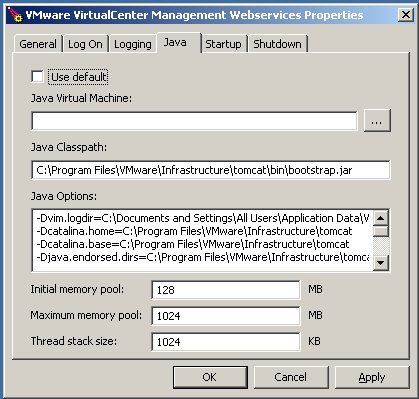
When you’re encountering this error, just run "C:\Program Files\VMware\Infrastructure\tomcat\bin\tomcat6w.exe" //ES//vctomcat

If the path to the Java.dll is empty and C:\Program Files\VMware\Infrastructure\jre is empty, download the Java 2 Standard Edition Runtime Environment (JRE),  release JRE 6 Update 17 or later from http://java.sun.com/j2se. Change the install path to C:\Program Files\VMware\Infrastructure\jre\
After that you have to select the option “Use default” in the Java tab at the VMware Virtual Management Webservices Properties and the service will start and function like a charm.


Dec 27, 2009 9:22:43 PM org.apache.coyote.http11.Http11Protocol init
INFO: Initializing Coyote HTTP/1.1 on http-127.0.0.1-8080
Dec 27, 2009 9:22:44 PM org.apache.coyote.http11.Http11Protocol init
INFO: Initializing Coyote HTTP/1.1 on http-8443
Dec 27, 2009 9:22:44 PM org.apache.catalina.startup.Catalina load
INFO: Initialization processed in 772 ms
Dec 27, 2009 9:22:44 PM org.apache.catalina.core.StandardService start
INFO: Starting service Catalina
Dec 27, 2009 9:23:16 PM org.apache.catalina.startup.Catalina start
INFO: Server startup in 26759 ms


I’m also experiencing a faster response when using  vSphere Web Access, maybe this is caused by the updated java runtime version.
Posted by
Eric Sloof
in vSphere at 04:46 | 2 Comments | No Trackbacks
Bookmark and Share
Trackbacks
Trackback specific URI for this entry
No Trackbacks
Comments
Display comments as (Linear | Threaded)
Hi Eric, experienced the same problem after an upgrade. But you can also point Tomcat to the JVM that comes with Orchestrator. In the Java Virtual Machine field you enter: C:\Program Files (x86)\VMware\Infrastructure\Orchestrator\jre\bin\client\jvm.dll No need to install JRE seperately. Luc.
#1 LucD (Homepage) on 2010-01-08 16:53 (Reply)
*Proceed with caution here.* I had a similar issue and decided to try upgrading java as noted above, but that completely broke my web management services. vmware told me that any direct upgrade of java is not supported. We ended up reinstalling vcenter from scratch. My issue ultimately ended up being a port conflict on port 8005 with a SAN utility that someone installed on the vcenter server. Changing the vmware web services to use port 8006 in server.xml resolved the issue as noted here > http://blog.vmpros.nl/2010/09/13/vmware-java-net-bindexception-address-already-in-use-jvm_bind/ Hope this info helps someone in the future. Cheers!
#2 Gipper on 2010-11-16 19:28 (Reply)
Add Comment
Standard emoticons like :-) and ;-) are converted to images.
E-Mail addresses will not be displayed and will only be used for E-Mail notifications.

To prevent automated Bots from commentspamming, please enter the string you see in the image below in the appropriate input box. Your comment will only be submitted if the strings match. Please ensure that your browser supports and accepts cookies, or your comment cannot be verified correctly.
CAPTCHA


Submitted comments will be subject to moderation before being displayed.


Twitter RSS FeedLinkedIn

www.hetesambal.nl

Veeam Webinar with Doug Hazelman: 5 Steps to Successful Backup & Replication for Hyper-V! Watch it now >>

Recent Entries

Video - vCloud Director 1.5 - Quick Start
Sunday, January 22 2012
White Paper - Mobility and Disaster Recovery Solution for Virtualized Tier-1 Enterprise Applications
Saturday, January 21 2012
Video - Install vSphere Syslog Collector and configure ESXi logging
Friday, January 20 2012
Storage Design and Implementation in vSphere 5.0 - The Rough Cuts
Thursday, January 19 2012
Top 25 Free Tools for VMware vSphere presented by David Davis and Kendrick Coleman
Monday, January 16 2012
LG Android running VMware Horizon Mobile hands-on
Saturday, January 14 2012
Forbes Guthrie has released the vSphere 5 vReference Card
Thursday, January 12 2012
VMworld Session - VMware vMotion in VMware vSphere 5: Architecture, Performance & Best Practices
Wednesday, January 11 2012
Voice Over IP (VoIP) Performance Evaluation on VMware vSphere 5.0
Tuesday, January 10 2012
VMware vCloud Director 1.5 Performance and Best Practices
Monday, January 9 2012

Archive

  • February 2012 (7)
  • January 2012 (22)
  • December 2011 (21)
  • November 2011 (24)
  • October 2011 (27)
  • September 2011 (26)
  • August 2011 (35)
  • July 2011 (26)
  • June 2011 (15)
  • May 2011 (20)
  • April 2011 (22)
  • March 2011 (22)
  • February 2011 (18)
  • January 2011 (13)
  • December 2010 (23)
  • November 2010 (18)
  • October 2010 (31)
  • September 2010 (22)
  • August 2010 (23)
  • July 2010 (19)
  • June 2010 (19)
  • May 2010 (19)
  • April 2010 (20)
  • March 2010 (23)
  • February 2010 (22)
  • January 2010 (30)
  • December 2009 (37)
  • November 2009 (29)
  • October 2009 (27)
  • September 2009 (36)
  • August 2009 (35)
  • July 2009 (35)
  • June 2009 (43)
  • May 2009 (35)
  • April 2009 (56)
  • March 2009 (51)
  • February 2009 (69)
  • January 2009 (69)
  • December 2008 (60)
  • November 2008 (56)
  • October 2008 (49)
  • September 2008 (63)
  • August 2008 (44)
  • July 2008 (54)
  • June 2008 (26)
  • May 2008 (34)
  • April 2008 (27)
  • March 2008 (38)
  • February 2008 (29)
  • January 2008 (35)
  • December 2007 (24)
  • November 2007 (23)
  • October 2007 (20)
  • September 2007 (54)
  • August 2007 (15)
  • July 2007 (22)
  • June 2007 (13)
  • May 2007 (8)
  • April 2007 (20)
  • March 2007 (10)
  • Recent...
  • Older...
Based on the s9y Bulletproof template framework
Powered by s9y – Template by Bulletproof development team.
  • NTPRO.NL
  • Online Training
  • VMworld
  • Videos
  • Tools
  • iTunes
  • About
