• Skip to site navigation
  • Skip to blog entries
  • Skip to archive page
  • Skip to right sidebar

Xtravirt vSphere Client RDP Plug-in

Eric Sloof - NTPRO.NL

  • NTPRO.NL
  • Online Training
  • VMworld
  • Videos
  • Tools
  • iTunes
  • About

Friday, 29 January 2010

Xtravirt vSphere Client RDP Plug-in

Paul Davey

Xtravirt is about to release another great tool; the vSphere Client RDP Plug-in. Last week Paul Davey has invited me to join the Xtravirt RDP Plug-in beta program. I was feeling very honored with his invitation and started performing some tests on their new RDP extension right away. I works like a charm, the installation is straight forward, after firing up the vSphere client the new RDP Plug–in is available at the vSphere Client plug-in manager.

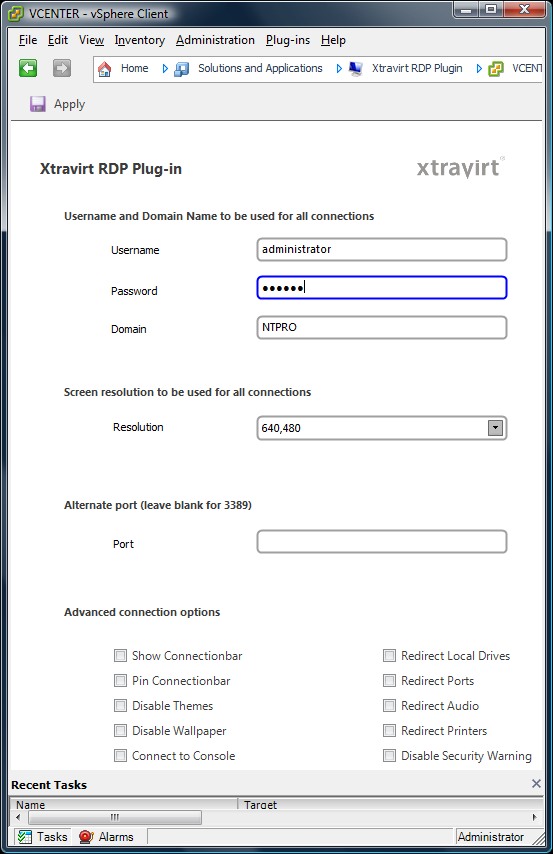
When you jump to “Home” (I still have to get used to that) you'll find the new RDP plug-in at the Solutions and Applications section.  Here you can configure the RDP behaviour like screen size, username, domain and port. When the setup of the global setting is done, it’s time to put the plug-in to test.

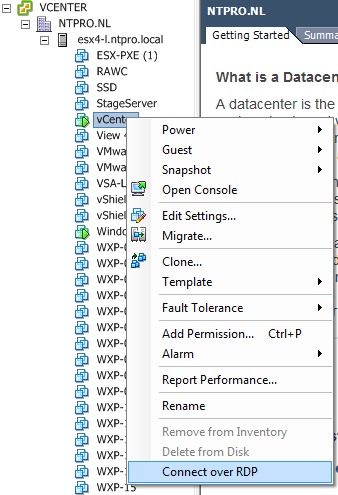
Just right click one of your virtual machines and check-out the context menu, you’ll see an extra option appears called Connect over RDP. Just select the new menu option and your RDP connection will initiate.

Update: I’ve just received an updated version from Paul with the following new features:

Password – you can now set a password to be used for all connections, allowing automatic logon.
Security Warning – Security Warnings can be disabled by ticking the relevant tick box.

Update: vSphere Client RDP Plug-in is released  - http://xtravirt.com/vsphere-client-rdp-plug-in

I’ve created a little Jing movie which shows the new version of the Plug-in in action.

Posted by
Eric Sloof
in Tools at 14:00 | 12 Comments | 1 Trackback
Bookmark and Share
Trackbacks
Trackback specific URI for this entry
Social comments and analytics for this post
This post was mentioned on Twitter by esloof: Xtravirt is about to release another great tool; the vSphere Client RDP Plug-in (kudos to @pauld_xtravirt) - http://bit.ly/c0mmuc
Weblog: uberVU - social comments
Tracked: Jan 30, 11:49
Comments
Display comments as (Linear | Threaded)
Why would we want this when we can use the console window??
#1 Tom on 2010-01-29 16:06 (Reply)
The console runs over VCN, it not performing that well in a WAN environment, besides that VMware advises to use an RDP session instead of using the console in a multi client situation.
#1.1 Eric Sloof (Homepage) on 2010-01-29 18:39 (Reply)
Tom, I think RDP is definitely faster than the Native Console window. Also, in multiuser environments, its not uncommon for me to find the console locked - RDP will just pop a new session and I don't have to inquire about whether the locked console is needed. Not a 'need to have' but definitely a 'nice to have'. :-) CARLO.
#1.2 Carlo Costanzo (Homepage) on 2010-01-29 18:40 (Reply)
That's a really handy PlugIN! Can't wait to download and test drive. -Carlo.
#2 Carlo Costanzo (Homepage) on 2010-01-29 18:24 (Reply)
Oh, this is great. For my own part "windows key -> mstsc /admin" is second nature and faster than finding the icon on my desktop, but this might just change that! Excellent!
#3 Christian Mohn (Homepage) on 2010-01-29 18:54 (Reply)
Thanks everyone for explaining...I don't have a large ESX environment and my client is in the same subnet as the VMs, so the above issues don't apply to me...
#4 Tom on 2010-01-29 20:17 (Reply)
Great such a plugin was missing for a long time. Sure I like to use it. Excellent! Manfred
#5 Manfred on 2010-01-31 18:42 (Reply)
I am glad that it is being this well received! It will be made available shortly to everyone for free from the www.xtravirt.com website. And Eric thanks for testing!
#6 Paul Davey (Xtravirt) (Homepage) on 2010-02-01 10:57 (Reply)
Excellent tools, but in my opinion it needs a bit of tuning for the vSphere Client to which IP to use in case if VM has got multiple IP Address, such as MSCS or ISA Server Array Clustered. For instance, suppose I have a MSCS cluster, the Resources are on one of the Node, so the Node is dedecting the Original IP, the Shared Public IP and the Private IP. In my case, the MSCS private IP is dedecting in the vi-Client. When I initiate an RDP Connection to the MSCS Node, it picks the Private IP instead of the Public Shared or it's orginal IP. In this case, RDP will not establish the connection. Another one is the ISA Enterprise Array Nodes, one of the ISA Nodes is detecting the DMZ IP Address, and when I initiate the RDP Connection it picks up the DMZ IP instead of the LAN IP in order to connect. Thanks, Habibalby
#7 Habibalby (Homepage) on 2010-02-02 08:05 (Reply)
Thats some great feedback! I will definately work something out for the next revision! Thanks! Paul Davey Xtravirt
#7.1 Paul Davey (Homepage) on 2010-02-02 09:55 (Reply)
looking forward to receive the great news from Xtravirt.com
#7.1.1 Habibalby on 2010-02-02 10:25 (Reply)
Is there possible to use the "DNS name" property instead of IP-address when connecting to VM?
#8 PhoenixUA on 2010-02-04 12:12 (Reply)
Add Comment
Standard emoticons like :-) and ;-) are converted to images.
E-Mail addresses will not be displayed and will only be used for E-Mail notifications.

To prevent automated Bots from commentspamming, please enter the string you see in the image below in the appropriate input box. Your comment will only be submitted if the strings match. Please ensure that your browser supports and accepts cookies, or your comment cannot be verified correctly.
CAPTCHA


Submitted comments will be subject to moderation before being displayed.


Twitter RSS FeedLinkedIn

www.hetesambal.nl

Veeam Webinar with Doug Hazelman: 5 Steps to Successful Backup & Replication for Hyper-V! Watch it now >>

Recent Entries

Video - vCloud Director 1.5 - Quick Start
Sunday, January 22 2012
White Paper - Mobility and Disaster Recovery Solution for Virtualized Tier-1 Enterprise Applications
Saturday, January 21 2012
Video - Install vSphere Syslog Collector and configure ESXi logging
Friday, January 20 2012
Storage Design and Implementation in vSphere 5.0 - The Rough Cuts
Thursday, January 19 2012
Top 25 Free Tools for VMware vSphere presented by David Davis and Kendrick Coleman
Monday, January 16 2012
LG Android running VMware Horizon Mobile hands-on
Saturday, January 14 2012
Forbes Guthrie has released the vSphere 5 vReference Card
Thursday, January 12 2012
VMworld Session - VMware vMotion in VMware vSphere 5: Architecture, Performance & Best Practices
Wednesday, January 11 2012
Voice Over IP (VoIP) Performance Evaluation on VMware vSphere 5.0
Tuesday, January 10 2012
VMware vCloud Director 1.5 Performance and Best Practices
Monday, January 9 2012

Archive

  • February 2012 (7)
  • January 2012 (22)
  • December 2011 (21)
  • November 2011 (24)
  • October 2011 (27)
  • September 2011 (26)
  • August 2011 (35)
  • July 2011 (26)
  • June 2011 (15)
  • May 2011 (20)
  • April 2011 (22)
  • March 2011 (22)
  • February 2011 (18)
  • January 2011 (13)
  • December 2010 (23)
  • November 2010 (18)
  • October 2010 (31)
  • September 2010 (22)
  • August 2010 (23)
  • July 2010 (19)
  • June 2010 (19)
  • May 2010 (19)
  • April 2010 (20)
  • March 2010 (23)
  • February 2010 (22)
  • January 2010 (30)
  • December 2009 (37)
  • November 2009 (29)
  • October 2009 (27)
  • September 2009 (36)
  • August 2009 (35)
  • July 2009 (35)
  • June 2009 (43)
  • May 2009 (35)
  • April 2009 (56)
  • March 2009 (51)
  • February 2009 (69)
  • January 2009 (69)
  • December 2008 (60)
  • November 2008 (56)
  • October 2008 (49)
  • September 2008 (63)
  • August 2008 (44)
  • July 2008 (54)
  • June 2008 (26)
  • May 2008 (34)
  • April 2008 (27)
  • March 2008 (38)
  • February 2008 (29)
  • January 2008 (35)
  • December 2007 (24)
  • November 2007 (23)
  • October 2007 (20)
  • September 2007 (54)
  • August 2007 (15)
  • July 2007 (22)
  • June 2007 (13)
  • May 2007 (8)
  • April 2007 (20)
  • March 2007 (10)
  • Recent...
  • Older...
Based on the s9y Bulletproof template framework
Powered by s9y – Template by Bulletproof development team.
  • NTPRO.NL
  • Online Training
  • VMworld
  • Videos
  • Tools
  • iTunes
  • About