• Skip to site navigation
  • Skip to blog entries
  • Skip to archive page
  • Skip to right sidebar

Creating Ethernet VLANs on Catalyst Switches

NTPRO.NL - Eric Sloof

  • NTPRO.NL
  • Online Training
  • VMworld
  • Videos
  • Tools
  • iTunes
  • About

Saturday, 30 January 2010

Creating Ethernet VLANs on Catalyst Switches

Part 1 – The setup

This week I’ve received a test model of the Cisco Catalyst 2960G-8TC-L from the nice people over at  Azlan, the Enterprise Division of Tech Data Corporation. The switch has 8 Ethernet 10/100/1000 ports, one of which is for dual-purpose, besides that it’s very compact in size with no fan. The 2960G-8TC-L is also fully compatible with the Catalyst series and has a LAN Based Image installed, the ideal switch for your home lab. I’m going to write a couple of articles about how to configure trunking between a Cisco Catalyst switch and a VMware distributed virtual switch.

First let’s start with the lab-setup, my home lab consists of two Asus barebones, both with 8 GB memory, some local 500 GB SATA disks and two Quad CPU Q9400 CPUs. For shared storage I’m using the Iomega StorCenter ix2 (Chad ;-)  I’m still waiting for the ix4). I’ve bought a couple of Intel PRO/1000 GT  single port network cards and have placed them in every free slot I could find in the barebones. This leaves me with 4 network cards per server, enough to setup a nice network test environment.
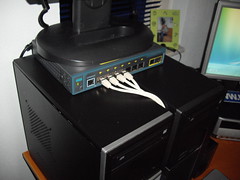
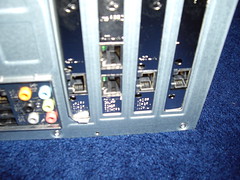
IMGP1787  IMGP1774

On my ESX server I’ve created a single standard virtual switch with two NICs which are connected to the Cisco switch. One Windows XP virtual machine with DHCP enabled. The VM is connected to the newly created Cisco VM Port Group. I’m going to use this virtual machine to do the initial configuration of the 2960.
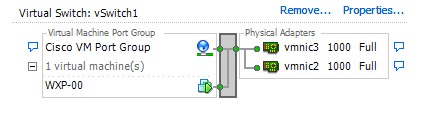
virtual_switch

The following step is taken from the Cisco’s getting started guide. When you first set up the switch, you should use Express Setup to enter the initial IP information. This enables the switch to connect to local routers and the Internet. You can then access the switch through the IP address for further configuration.

When the switch power is on, it begins the power-on self-test (POST). During POST, the LEDs blink while tests verify that the switch functions properly. Wait for the switch to complete POST, which can take several minutes.

Press and hold the Mode button for 3 seconds. When all of the LEDs left of the Mode button turn green, release the Mode button. If the LEDs left of the Mode button begin to blink, after you press the button, release it. Blinking LEDs mean that the switch has already been configured and cannot go into Express Setup mode. During Express Setup, the switch acts as a DHCP server. If your PC has a static IP address, change your PC settings before you begin to temporarily use DHCP.
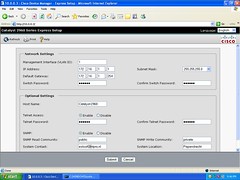
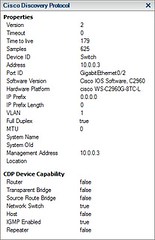
vm_1  CDP  vm_2

Now I’m logged on to the console of the VM and I opened up the Internet Explorer. When I’m looking at the Cisco Discovery Protocol information, I can see that the IP address of the switch is 10.0.0.3. I’ve pointed the browser to that address to provide the switch with its final IP address.

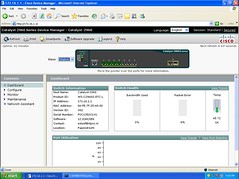
The switch is configured with IP address 172.16.1.1. The VM is able to log on to the newly configured address and I’ve gained access to the Catalyst 2960 Series Device Manager.

ntpro.nl - View my 'Cisco Project' set on Flickriver

Posted by
Eric Sloof
in Cisco at 22:32 | 1 Comment | No Trackbacks
Bookmark and Share
Trackbacks
Trackback specific URI for this entry
No Trackbacks
Comments
Display comments as (Linear | Threaded)
No console cable fun? Thanks for pointing out CDP, I'm going to have to read up on the documents as I was planning on using Cisco equipment in my soon to be home lab.
#1 Jason Ruiz (Homepage) on 2010-01-31 00:38 (Reply)
Add Comment
Standard emoticons like :-) and ;-) are converted to images.
E-Mail addresses will not be displayed and will only be used for E-Mail notifications.

To prevent automated Bots from commentspamming, please enter the string you see in the image below in the appropriate input box. Your comment will only be submitted if the strings match. Please ensure that your browser supports and accepts cookies, or your comment cannot be verified correctly.
CAPTCHA


Submitted comments will be subject to moderation before being displayed.


Twitter RSS FeedLinkedIn

www.hetesambal.nl

Veeam Webinar with Doug Hazelman: 5 Steps to Successful Backup & Replication for Hyper-V! Watch it now >>

Recent Entries

Storage Design and Implementation in vSphere 5.0 - The Rough Cuts
Thursday, January 19 2012
Top 25 Free Tools for VMware vSphere presented by David Davis and Kendrick Coleman
Monday, January 16 2012
LG Android running VMware Horizon Mobile hands-on
Saturday, January 14 2012
Forbes Guthrie has released the vSphere 5 vReference Card
Thursday, January 12 2012
VMworld Session - VMware vMotion in VMware vSphere 5: Architecture, Performance & Best Practices
Wednesday, January 11 2012
Voice Over IP (VoIP) Performance Evaluation on VMware vSphere 5.0
Tuesday, January 10 2012
VMware vCloud Director 1.5 Performance and Best Practices
Monday, January 9 2012
VMware vCenter Site Recovery Manager 5.0 Performance and Best Practices
Sunday, January 8 2012
New Training - VMware vSphere 5 Design Workshop
Saturday, January 7 2012
New Training - VMware View 5 Install, Configure and Manage
Friday, January 6 2012

Archive

  • February 2012 (3)
  • January 2012 (23)
  • December 2011 (21)
  • November 2011 (24)
  • October 2011 (27)
  • September 2011 (26)
  • August 2011 (35)
  • July 2011 (26)
  • June 2011 (15)
  • May 2011 (20)
  • April 2011 (22)
  • March 2011 (22)
  • February 2011 (18)
  • January 2011 (13)
  • December 2010 (23)
  • November 2010 (18)
  • October 2010 (31)
  • September 2010 (22)
  • August 2010 (23)
  • July 2010 (19)
  • June 2010 (19)
  • May 2010 (19)
  • April 2010 (20)
  • March 2010 (23)
  • February 2010 (22)
  • January 2010 (30)
  • December 2009 (37)
  • November 2009 (29)
  • October 2009 (27)
  • September 2009 (36)
  • August 2009 (35)
  • July 2009 (35)
  • June 2009 (43)
  • May 2009 (35)
  • April 2009 (56)
  • March 2009 (51)
  • February 2009 (69)
  • January 2009 (69)
  • December 2008 (60)
  • November 2008 (56)
  • October 2008 (49)
  • September 2008 (63)
  • August 2008 (44)
  • July 2008 (54)
  • June 2008 (26)
  • May 2008 (34)
  • April 2008 (27)
  • March 2008 (38)
  • February 2008 (29)
  • January 2008 (35)
  • December 2007 (24)
  • November 2007 (23)
  • October 2007 (20)
  • September 2007 (54)
  • August 2007 (15)
  • July 2007 (22)
  • June 2007 (13)
  • May 2007 (8)
  • April 2007 (20)
  • March 2007 (10)
  • Recent...
  • Older...
Based on the s9y Bulletproof template framework
Powered by s9y – Template by Bulletproof development team.
  • NTPRO.NL
  • Online Training
  • VMworld
  • Videos
  • Tools
  • iTunes
  • About