• Skip to site navigation
  • Skip to blog entries
  • Skip to archive page
  • Skip to right sidebar

Virtual Machine MKS Client v1.5

Eric Sloof - NTPRO.NL

  • NTPRO.NL
  • Online Training
  • VMworld
  • Videos
  • Tools
  • iTunes
  • About

Tuesday, 24 July 2007

Virtual Machine MKS Client v1.5

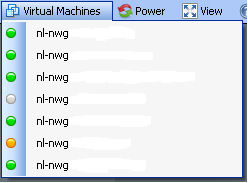
I added another really cool feature to the Virtual Machine MKS Client. When you click on the menu item Virtual Machines you will see a list of all your virtual machines. On the left of the virtual machine you see a little bullet. This bullet is an indicator of the overall status of the virtual machine. When the bullet is green there is nothing wrong. When it’s grey the virtual machine is powered down. When it’s red there is an alarm and when it’s yellow there is a warning.You can find the download link for the Virtual Machine MKS Client v1.5 in the software menu item of my blog.
 

Posted by
Eric Sloof
in VM MKS Client at 15:17 | 5 Comments | No Trackbacks
Bookmark and Share
Trackbacks
Trackback specific URI for this entry
No Trackbacks
Comments
Display comments as (Linear | Threaded)
Hi Eric, can you please add a button to send ctrl+alt+del on the tool also?
#1 Richard (Homepage) on 2007-07-24 22:52 (Reply)
Hello Richard, I added the send CAD although you can generate a CAD on your keyboard with Ctrl-Alt-Ins. You can find the option under the view menu. Thanks for testing, Eric Sloof
#1.1 Eric Sloof (Homepage) on 2007-07-25 07:26 (Reply)
Give us the ability to hide the toolbar and the window bluebar when we put the program in full screen and you have the perfect replacement of Terminal server (RDP). The idea is to launch separate instances of the program to process demonstration in "almost" full screen mode on one multi-screen computer I've try to created also, but the time is missing.... the good idea is to publish your sources, or almost the startup version of this program Good job Philippe Sometimes know as UnclePhil
#2 Philippe (Homepage) on 2007-07-25 15:18 (Reply)
Additional I know you've implemented the view full screen, but in this case the mouse is locked to the vm, and you cannot swith to the second or third screen to show a presentation or another vm ...... That's the end .... for the moment ;-) Philippe
#2.1 Philippe (Homepage) on 2007-07-25 15:24 (Reply)
Philippe, your wish is my command. I added the option borderless under the view menu. When you click the maximize button and then hit Ctrl+Space the border and menu strip will disappear. To return to the boxed application just hit Ctrl+Space, but be sure the application has the focus. Just one other question, when you are going to use my application for commercial purposes, what’s the company name and address for the invoice ;-)
#2.1.1 Eric Sloof (Homepage) on 2007-07-25 21:20 (Reply)
Add Comment
Standard emoticons like :-) and ;-) are converted to images.
E-Mail addresses will not be displayed and will only be used for E-Mail notifications.

To prevent automated Bots from commentspamming, please enter the string you see in the image below in the appropriate input box. Your comment will only be submitted if the strings match. Please ensure that your browser supports and accepts cookies, or your comment cannot be verified correctly.
CAPTCHA


Twitter RSS FeedLinkedIn

www.hetesambal.nl

Veeam Webinar with Doug Hazelman: 5 Steps to Successful Backup & Replication for Hyper-V! Watch it now >>

Recent Entries

Video - vCloud Director 1.5 - Quick Start
Sunday, January 22 2012
White Paper - Mobility and Disaster Recovery Solution for Virtualized Tier-1 Enterprise Applications
Saturday, January 21 2012
Video - Install vSphere Syslog Collector and configure ESXi logging
Friday, January 20 2012
Storage Design and Implementation in vSphere 5.0 - The Rough Cuts
Thursday, January 19 2012
Top 25 Free Tools for VMware vSphere presented by David Davis and Kendrick Coleman
Monday, January 16 2012
LG Android running VMware Horizon Mobile hands-on
Saturday, January 14 2012
Forbes Guthrie has released the vSphere 5 vReference Card
Thursday, January 12 2012
VMworld Session - VMware vMotion in VMware vSphere 5: Architecture, Performance & Best Practices
Wednesday, January 11 2012
Voice Over IP (VoIP) Performance Evaluation on VMware vSphere 5.0
Tuesday, January 10 2012
VMware vCloud Director 1.5 Performance and Best Practices
Monday, January 9 2012

Archive

  • February 2012 (7)
  • January 2012 (22)
  • December 2011 (21)
  • November 2011 (24)
  • October 2011 (27)
  • September 2011 (26)
  • August 2011 (35)
  • July 2011 (26)
  • June 2011 (15)
  • May 2011 (20)
  • April 2011 (22)
  • March 2011 (22)
  • February 2011 (18)
  • January 2011 (13)
  • December 2010 (23)
  • November 2010 (18)
  • October 2010 (31)
  • September 2010 (22)
  • August 2010 (23)
  • July 2010 (19)
  • June 2010 (19)
  • May 2010 (19)
  • April 2010 (20)
  • March 2010 (23)
  • February 2010 (22)
  • January 2010 (30)
  • December 2009 (37)
  • November 2009 (29)
  • October 2009 (27)
  • September 2009 (36)
  • August 2009 (35)
  • July 2009 (35)
  • June 2009 (43)
  • May 2009 (35)
  • April 2009 (56)
  • March 2009 (51)
  • February 2009 (69)
  • January 2009 (69)
  • December 2008 (60)
  • November 2008 (56)
  • October 2008 (49)
  • September 2008 (63)
  • August 2008 (44)
  • July 2008 (54)
  • June 2008 (26)
  • May 2008 (34)
  • April 2008 (27)
  • March 2008 (38)
  • February 2008 (29)
  • January 2008 (35)
  • December 2007 (24)
  • November 2007 (23)
  • October 2007 (20)
  • September 2007 (54)
  • August 2007 (15)
  • July 2007 (22)
  • June 2007 (13)
  • May 2007 (8)
  • April 2007 (20)
  • March 2007 (10)
  • Recent...
  • Older...
Based on the s9y Bulletproof template framework
Powered by s9y – Template by Bulletproof development team.
  • NTPRO.NL
  • Online Training
  • VMworld
  • Videos
  • Tools
  • iTunes
  • About


