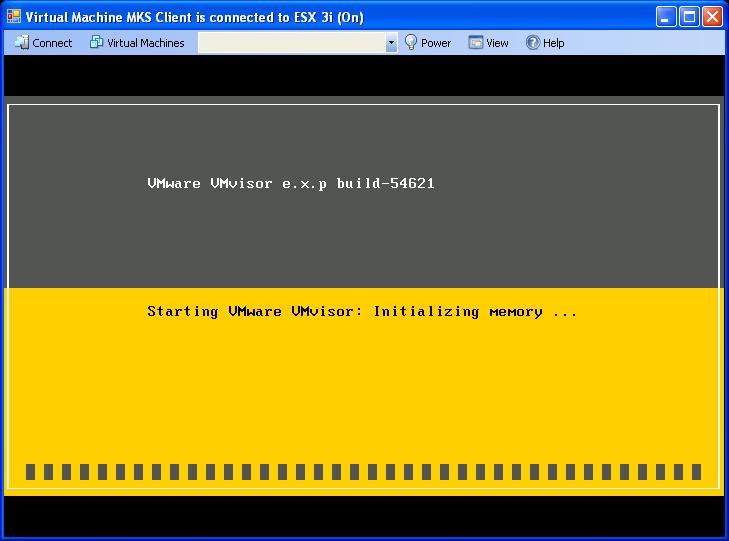
 Since my memory stick is broken I had to find out how I could carry on with exploring the new futures of ESX 3i. I was lucky; one of my fellow VMware trainers was willing enough to provide me with an image of his USB stick. What I did is use an existing virtual machine and added a one gigabyte hard disk. I downloaded Selfimage and placed the ESX 3i image on the new disk. I disconnected the disk and created a new virtual machine. I have chosen for “other Linuxâ€? with one gigabyte memory and two network adapters and connected the ready made “one gigabyte diskâ€? as an existing disk. The last step was powering on the new VM. You see the result in the screen dump.



Recent Entries
- CoolTool: VirtualC64
- Friday, April 12 2024
- Cilium Certified Associate Exam - Preparation Manual
- Monday, March 25 2024
- Python Mastery From Basics to Brilliance - How-to Video on Configuring an OpenAI API Key
- Thursday, February 22 2024
- Free Training Course - Designing, Configuring, and Managing the VMware Cloud
- Saturday, February 17 2024
- Discover the Versatility of ElevenLabs Voice Technology
- Wednesday, February 14 2024
- Exploring the World of Matter: The Future of Smart Home Technology
- Wednesday, February 7 2024
- Navigating the World of Artificial Intelligence: A Guide to the Latest AI Technologies
- Wednesday, February 7 2024
- UTM: The Ultimate Virtual Machine Experience for iOS and macOS
- Friday, January 19 2024
- Streamlining vSphere Operations with ChatGPT
- Monday, January 15 2024
- The vSphere Metrics Book - 3rd edition
- Friday, January 12 2024
- Setting Up ESXi ARM on the Raspberry Pi 5
- Friday, January 12 2024
- Mastering vCenter Operations with Python: A Script to Manage Your VMs
- Tuesday, January 9 2024
- Harvesting Data: Python's Gateway to Aria Operations Metrics
- Tuesday, January 9 2024
- TensorFlow Management Pack For VMware Aria Operations
- Saturday, December 23 2023
- VMware Aria Operations API – Postman Collection
- Tuesday, December 19 2023
- Integrating the Raspberry Pi Pico with Aria Operations - Introduction
- Monday, December 11 2023
- vSAN Adaptive Quorum Control in a stretched cluster
- Sunday, November 26 2023
- TensorFlow Lite on a Raspberry Pi 5 with Camera Module 3
- Friday, November 24 2023
- Raspberry Pi 5 Remote Access
- Saturday, November 11 2023
- Raspberry Pi Pico LED Control by ChatGPT
- Wednesday, November 8 2023
- VCI of the Year EMEA 2023
- Monday, November 6 2023
- Performance Best Practices for VMware vSphere 8.0 Update 2
- Monday, November 6 2023
- BGP Neighbour Adjacency between GNS3 and VMware NSX
- Monday, November 6 2023
- Controlling the Elgato Key Light Air with a Raspberry Pi Pico
- Thursday, November 2 2023
- MacBook Pro with the M2 compatible USB C adapters
- Friday, October 13 2023
- Whiteboard session - NSX Geneve Overlay Networking and Distributed Routing
- Thursday, October 12 2023
- Running ESXi, Photon and Windows on Fusion - ARM
- Friday, September 29 2023
- VMware vSAN 8 Update 2 Technical Overview
- Monday, September 18 2023
- VMware NSX-T Reference Design 4.1
- Tuesday, September 12 2023
- Optimizing Networking and Security Performance Using VMware vSphere and NVIDIA BlueField DPU with BWI
- Sunday, September 3 2023
- Excalidraw - VMware architecture icons
- Thursday, August 31 2023
- Flooding in Las Vegas
- Sunday, August 27 2023
- NSX Anti-Malware Detection - Presentation
- Wednesday, July 19 2023
- Update - vSphere Diagnostic Tool
- Monday, June 26 2023
- New Book - Hyperconverged Infrastructure for Dummies Guide
- Thursday, June 1 2023
- New Book - vSphere Metrics - Deep dive into VMware vCenter and ESXi performance and capacity counters
- Thursday, June 1 2023
- Performance Best Practices for VMware vSphere 8.0 Update 1
- Tuesday, May 30 2023
- New Technical White Paper - Lower Infrastructure Costs with VMware vSAN 8 and vSAN Express Storage Architecture
- Wednesday, May 17 2023
- New Book - VMware vSAN 8.0 U1 Express Storage Architecture Deep Dive
- Thursday, April 27 2023
- vSphere 8 Update 1 What's New?
- Saturday, April 22 2023
- VMware Labs has released a new Fling - Power Actions
- Friday, April 21 2023
- VMware Multi-Cloud Briefing April 2023
- Sunday, April 9 2023
- Free e-book - The Legacy Trap
- Thursday, March 30 2023
- New Technical White Paper - VMware vSphere 7.0 U2 Tagging Best Practices
- Friday, March 17 2023
- VMware Labs has released a new Fling - vSphere Alert Center
- Saturday, March 4 2023
- What's New in VMware vSAN 8
- Saturday, February 25 2023
- RVTools version 4.4.1 is now available for download
- Monday, February 13 2023
- Working with Beacons in VMware Aria Automation Config
- Thursday, February 2 2023