Peter van den Bosch over at PQR has created a nice PDF document. The Virtualization capacity sizing and planning solutions feature comparison matrix. This matrix compares the features of the industry’s most popular virtualization sizing and planning products.
Monday, July 23. 2007
The capacity sizing and planning solutions matrix
Virtual Machine MKS Client v1.4
Saturday, July 21. 2007
Virtual Machine MKS Client v1.3
I fixed a major bug, this bug was responsible for randomly black screens when connecting to a VM. I also added an extra menu item. This new menu item is called Full Screen. When you select it you will see the VM console in Full Screen mode. Don’t forget to press CTRL+ALT to return.
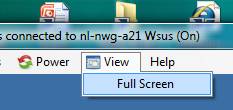
You can find the download link for the Virtual Machine MKS Client v1.3 in the software menu item of my blog.
Friday, July 20. 2007
Virtual Machine MKS Client v1.2
First of all I would like to thank Robert Baumstark. He is the one who has build the VIClient.dll and helped me tremendously. I created a new version of the Virtual Machine MKS Client, this version has better sizing, very handy when working on a small desktop with large virtual machines. Another new thing is the title bar, it displays the status and name of the controlled virtual machine. You can download the new version here.
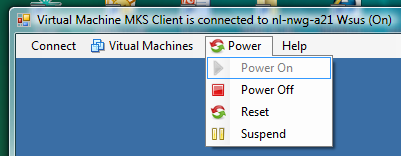
Then about the contest, Richard Garthagen joined in so we can expect a MKS tool on run-virtual this summer. Bouke Groenescheij was behaving very strange yesterday. He wouldn’t talk to me and suddenly claimed a new domain name and made an announcement about vvi-world ? I suspect someone has put something in his tea here at Ahrend ;-). I took a peek at his KVM-Tool and it’s impressive. His tool allows you to open multiple console sessions and logs on to an ESX server directly.
What to expect in the future, well I like the multiple screen option so I’m going to build a tear off button. Besides that Dee made a comment and suggested to allow the virtual machine to be connected to the local CD drive on the client. Any other suggestions are welcome.
Wednesday, July 18. 2007
ESX Manager 2.1 released by ESXGuide
 (Page 2 of 5, totaling 22 entries)

