Richard Garsthagen over at Run-Virtual created another nice tool. VMjuggler is an application Richard wrote to use during demonstrations. The program is quite simple, it connects to VirtualCenter 2.x and you can select a VM and 2 hosts. After selecting this you can start the VMjuggler and the VM will be moves every 10 seconds between the hosts. The VMjuggler has been added to the vm4all.com website.
Wednesday, November 28. 2007
PowerShell Snapshot hunter
I wrote a little PowerShell script that lists all the virtual hard disk files (and their paths) who are in snapshot mode. It’s nothing fancy really, just gives a little insight in how to retrieve objects.
Get-VIServer "VCSERVER" -User eric -Password sloof
$Datacenter = Get-Datacenter
$AllVirtualMachines = Get-VM -Location $Datacenter
$AllSnapshots = Get-Snapshot $AllVirtualMachines
Get-HardDisk -Snapshot $AllSnapshots | findstr "Filename"
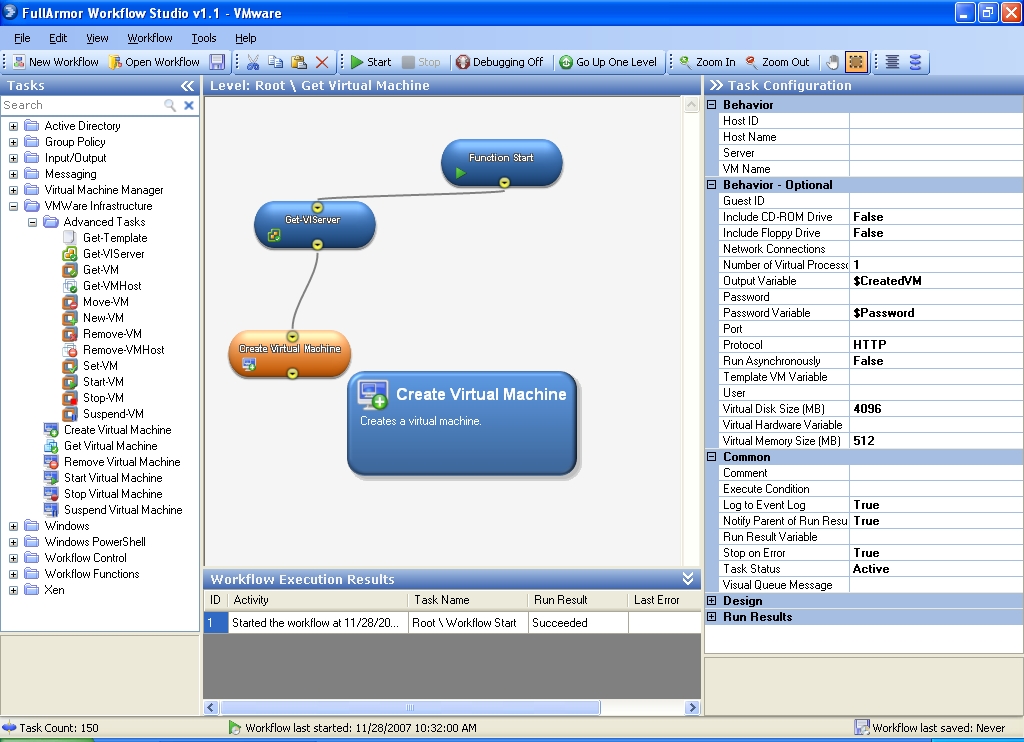
VMWare Infrastructure Task Library in Workflow Studio
FullArmor delivers on its promise of virtual machine provisioning and automation capabilities with the release of Workflow Studio version 1.1 beta 1. So, what's new in version 1.1? Among the eleven new enhancement there is one interesting library in particular: the VMware Infrastructure Task Library. With this library you can completely provision and automate your VI3 infrastructure. Create, start, stop, suspend, resume, move, delete, and modify VMs.![]()
Tuesday, November 27. 2007
ManageIQ Launches Enterprise Virtualization Management Suite
ManageIQ™, the emerging leader in the management and automation of virtualized computing environments, today announced EVM™ Insight. EVM Insight, a component of the company's new Enterprise Virtualization Management™ (EVM) suite, gives organizations unparalleled visibility into their virtual environments by providing the comprehensive configuration information they need to effectively manage and control their virtual infrastructure.
Friday, November 23. 2007
Monitoring your VM CPU with PowerShell
I wrote a PowerShell script that takes a few samples of your VM CPU MHZ average. The script uses the VMware PowerShell snap-in, the output is piped to the Out-String cmdlet. The Out-String cmdlet converts the objects that Windows PowerShell manages into an array of strings. By default, Out-String accumulates the strings and returns them as a single string, but you can use the stream parameter to direct Out-String to return one string at a time. This cmdlet lets you search and manipulate string output as you would in traditional shells when object manipulation is less convenient.
Get-VIServer "virtualcenter.ntpro.local" -User Eric -Password Sloof
$VirtualMachine = Get-VM|where {$_.Name -Like "nl-nwg-xp-1"}
Get-Stat -Entity $VirtualMachine -Realtime -MaxSamples 3 -Stat "cpu.usagemhz.average" |Out-String
Name
----
virtualcenter.ntpro.local
MetricId Timestamp Value Unit
--------- ---------- ----- ----
cpu.usagemhz.average 11/23/2007 8:23:2... 28 MHz
cpu.usagemhz.average 11/23/2007 8:23:0... 31 MHz
cpu.usagemhz.average 11/23/2007 8:22:4... 29 MHz

