The ESX System Analyzer is a tool designed to help administrators plan a migration from ESX to ESXi. It analyzes the ESX hosts in your environment and, for each host, collects information on factors that pertain to the migration process:
• Hardware compatibility with ESXi
• VMs registered on the ESX host, as well as VMs located on the host’s local disk
• Modifications to the Service Console RPMs which have been added or removed or files which have been added or users and cronjobs which have been added
This tool also provides summary information for the whole existing environment
• Version of VMware Tools and Virtual Hardware for all VMs
• Version of Filesystem for all datastores
By having this information, administrators can determine what tasks need to be done prior to the migration. Examples include:
• Relocate VMs from local datastores to shared datastores
• Replace cronjobs with equivalent remote scripts written with PowerCLI or vCLI
• Make note of what agent software has been added to the host and obtain the equivalent agentless version
Be one of the first one to try, rate and comment - ESX-system-analyzer
Update: Remon Lam over at VirtualVlouds.info has figuered out the username and password, he also has a link to the userguide.
Wednesday, November 30. 2011
VMware Labs presents its latest fling - ESX System Analyzer
Tuesday, November 29. 2011
The Dutch VMUG event 2011 – Impressive Speaker Line-Up
Viktor van den Berg is ramping up. He has presented a great line-up of speakers who are going to deliver the most awesome sessions at the Dutch VMUG event. If you didn’t register yet, there's still a chance. Make sure you mark the 9th of December in your agenda. More information can be found here.
Here’s the list with the celebrities: • Alan Renouf, Senior Technical Marketing, VMware
• Andre van der Werff, Senior Systems Engineer, VMware
• Bob de Kousemaeker, Principal Product Manager, RES Software
• Bouke Groenescheij, Freelance Consultant, jume.nl
• Cormac Hogan, Technical Marketing Manager for Storage, VMware
• Duncan Epping, Principal Architect, Technical Marketing, VMware
• Eric Sloof, Freelance Trainer/Consultant, Famous Blogger, NTPRO.NL
• Gabrie van Zanten, gabesvirtualworld.com / Consultant - OpenLine
• Henk Arts, Senior System Engineer, Veeam Software
• Jeroen van de Kamp, CTO, Login Consultants
• Luc Dekens, System Engineer, Eurocontrol Maastricht
• Marcel Steenman, Senior Technical Consultant, Platani
• Mattias Sundling, Virtualization Expert, Quest
• Michael Heffernan, Global Chief Technologist Virtualisatie, Hitachi Data Systems
• Raymon Epping, Technical Account Manager, Professional Services, VMware
• Ruben Spruijt, Technology Officer, PQR
• Stefan Willems, Senior Solution Architect, Platani
• Verron Martina, vSpecialist, EMC
• Viktor van den Berg, VMware Consultant, PQR, Dutch VMUG Leader
Sunday, November 27. 2011
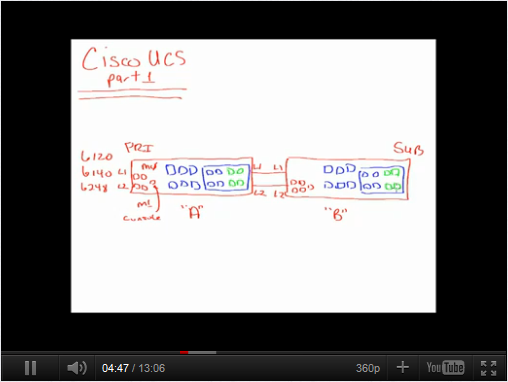
Cisco UCS white boarding with Jeffrey Hall
 Jeff works as a full-time Independent Instructor/Consultant that focuses on Cisco UCS and IP Telephony technologies as well as VMware virtualization solutions. One of his biggest interests is the implementation of Unified Communications on the Cisco UCS solution using VMware’s vSphere datacenter suite.
http://www.linkedin.com/in/layer8man
He has started a weblog over at cloudinaround.com, in one of his most recent articles he introduces the first in a series of videos that will explore the Cisco UCS architecture and signal flow. In this first video, he starts by identifying the main components and their connectivity. In follow-on videos, he’ll dive deeper into how everything communicates.
Icomasoft has released opvizor 1.5 also available as freeware
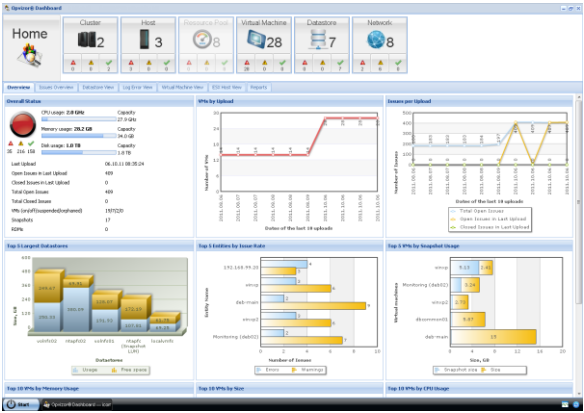 As of today, the software-as-a-service solution opvizor for analyzing and rectifying configuration, performance and security errors in virtualized environments is available on the market in Version 1.5. The new version’s architecture has been optimized in particular for medium-sized and large virtualized infrastructures. This is coupled with improvements in performance, disguising, in reporting and with an enlarged set of rules. As was the case for its predecessor, opvizor 1.5 is available on www.opvizor.com as a commercial and a free version.
Continue reading "Icomasoft has released opvizor 1.5 also..." »
As of today, the software-as-a-service solution opvizor for analyzing and rectifying configuration, performance and security errors in virtualized environments is available on the market in Version 1.5. The new version’s architecture has been optimized in particular for medium-sized and large virtualized infrastructures. This is coupled with improvements in performance, disguising, in reporting and with an enlarged set of rules. As was the case for its predecessor, opvizor 1.5 is available on www.opvizor.com as a commercial and a free version.
Continue reading "Icomasoft has released opvizor 1.5 also..." »
Wednesday, November 23. 2011
Video - Using the ESXI 5.0 vCLI Command Set

