The information being presented in this paper comes courtesy of the great minds of Eric Sloof, a VMware Certified Instructor, vExpert, consultant and active VMware community member; and Mattias Sundling, also a vExpert, a Quest Software employee and an evangelist focused on the virtualization space. The information presented here was discussed in depth during an April 2, 2012 webcast with Mattias Sundling and Eric Sloof.
Regardless of the underlying technology solution, as anything becomes increasingly popular and widespread in use, certain pieces of sometimes inaccurate information about that product become permanent fact, often taking on legend-like status. Moreover, as a product matures, it changes; it evolves by taking on new features, shedding old ones and improving the functionality everywhere else. However, no matter how much a product matures and no matter how much it evolves, many products carry with them myths that follow through the ages. Myths that may or may not have once been true, but are used as truisms nonetheless even as the version count rises ever higher. In this white paper, we will expose four such myths.
Myth #1: RDMs have better performance than VMFS
Myth #2: Changed Block Tracking causes significant overhead on your virtual machines
Myth #3: Resource pools should always be used to categorize and allocate resources to virtual machines
Myth #4: LSI Logic SCSI is always better than paravirtualized SCSI
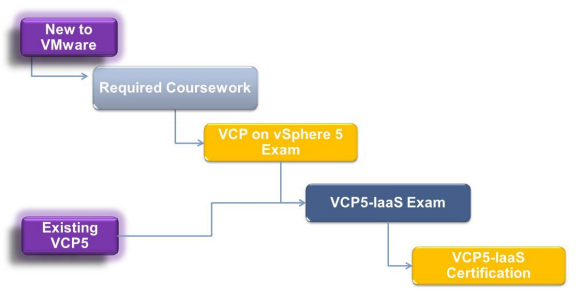
Some individuals are about to be invited to paticipate in a new beta certification program launched by VMware. The rumor goes that the public exam should be live late July. The VCPVCD511 VMware Certified Professional 5 – Infrastructure as a Service beta exam tests potential VCP5-IaaS candidates on their skills and abilities installing, configuring and administering a vCloud environment.
Successful candidates demonstrate mastery of these skills and abilities. The VCPVCD511 beta exam consists of 115 questions and a short pre-exam survey consisting of 8 questions. The passing score for this exam is 300, using a scaled scoring method.
The scale is from 100-500. Scaled scores are calculated using a mathematical formula that considers a variety of factors, including the number and type of exam questions included in a specific version of the exam. Because this combination may vary in different versions of the same examination, scaled scores provide a fair score for each individual based on the version of the exam taken. A candidate for the VCP5-IaaS certification should be capable of installing and configuring vCloud Director and related components, utilizing vCD to create and manage vApps, Service Catalogs, Organization/provider VDCs, and administering cloud enabled networking and storage.
The successful candidate will most likely have previous experience working with a vSphere infrastructure, including configuration and management tasks associated with vSphere (typically 1 or more years). Finally, the candidate should possess an understanding of basic cloud concepts including public/private/hybrid clouds, multi-tenancy and cloud security.
It is recommended that candidates have the knowledge and skills necessary to install, configure and administer a vCloud environment before taking the VCPVCD511 exam. It is also recommended that the candidate complete the course requirement prior to attempting the exam. It is not required that the course is completed prior to the exam, but the course requirement must be completed in order to obtain the VCP5-IaaS certification.
Great video from Pete Long about VMware View 5 Persona Management. You should also check-out his website at petenetlive.com.
With VMware View 5, VMware introduces View Persona Management. View Persona Management preserves user profiles and dynamically synchronizes them with a remote profile repository. View Persona Management does not require the configuration of Windows roaming profiles, and you can bypass Windows Active Directory in the management of View user profiles. If you already use roaming profiles, Persona Management enhances their functionality.
Persona Management downloads only the files that Windows requires at login, such as user registry files. When the user or application opens other files from the desktop profile folder, these files are copied from the stored user persona to the View desktop. This algorithm provides performance beyond that achieved with Windows roaming profiles.
In addition, View copies recent user profile changes to the desktop profile up to the remote repository every few minutes. The default is every ten minutes, and this time period is configurable.
Virtual machine storage provisioning historically has imposed operational challenges. Monitoring datastore capacity and I/O load has proven to be very difficult and as a result is often neglected. During the provisioning process for virtual machines, virtual disk datastores are often randomly selected, leading to hot spots and over- or underutilized data-stores. Storage DRS is a new feature introduced in VMware vSphere 5.0 that provides smart virtual machine placement and load balancing mechanisms based on I/O and space capacity.
It will help decrease operational effort associated with the provisioning of virtual machines and monitoring of the storage environment. This document presents an overview of best practices for customers considering the implementation of VMware vSphere Storage DRS in combination with advanced storage device features or other VMware products.
Today, Virtualization Desktop Infrastructure (VDI) is a key initiative for many organizations looking to reduce administrative overhead while providing a more secure, flexible and reliable desktop computing environment for end users. Proper planning and good decision making are required to ensure a successful deployment. Choosing the right virtualization platform to host the virtual desktop implementation is often the first major decision and— to a large degree— can make or break the entire transformation. Important considerations when choosing the best VDI platform include:
Does the platform provide the features, reliability, and high availability to meet the business requirements?
Is the platform reliable and proven?
Does the platform provide a secure foundation for all the virtual desktops?
Can the infrastructure be standardized on the same platform as the existing server virtualization?
How will the choice made today impact future migration to a cloud environment?
How does the VDI platform choice impact options for a VDI solution?
Based on the above criteria, the best choice for most VDI deployments is vSphere because:
vSphere is the leading virtualization platform and provides unbeatable reliability, high availability, business continuity, and fault tolerance.
Customers can standardize on a common cloud infrastructure platform from the desktop through the datacenter and to the cloud.
VMware View and vSphere integration maximizes the benefits of the leading virtualization platform for VDI.
This paper takes a look at each of these attributes in the context of the unique needs of the VDI market.