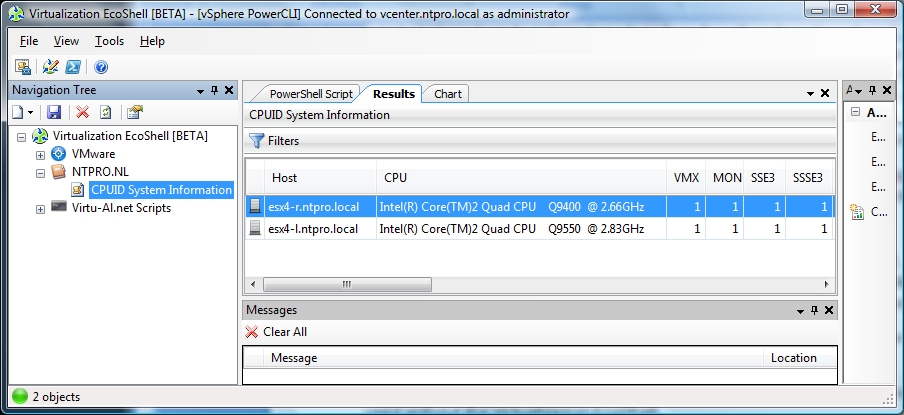
I’ve created a new Virtualization EcoShell PowerPack with only one Script Node and it’s called “CPUID System Information“ which shows the VMHost CPU Info. The inspiration for building this new PowerPack came from VMware’s evangelist Richard Garsthagen who has built the well known Visual Basic Application, VMware CPU Host Info. “CPUID System Information” is completely based on PowerShell and VMware’s PowerCLI. The script is able to show you which features (CPUIDs) are available on your ESX server’s CPUs. Besides checking VMotion compatibility it also shows you:
- Enhanced VMotion Compatibility (EVC) levels which simplifies VMotion compatibility issues across CPU generations. EVC automatically configures server CPUs with Intel FlexMigration or AMD-V Extended Migration technologies to be compatible with older servers.
- All the important CPU features like: VMX, MONITOR/MWAIT , SSE3, SSSE3 ,SSE4.1 ,SSE4.2 ,CMPXCHG8B ,CMPXCHG16B ,NX/XD ,Long mode support ,RDTSCP ,3DNow! ,3DNow! Extensions ,FFXSR ,Prefetch instructions.
I’ve three versions available for download.
The first one can be used as a PowerPack in the Virtualization EcoShell.
http://www.ntpro.nl/blog/uploads/NTPRO.NL.powerpack