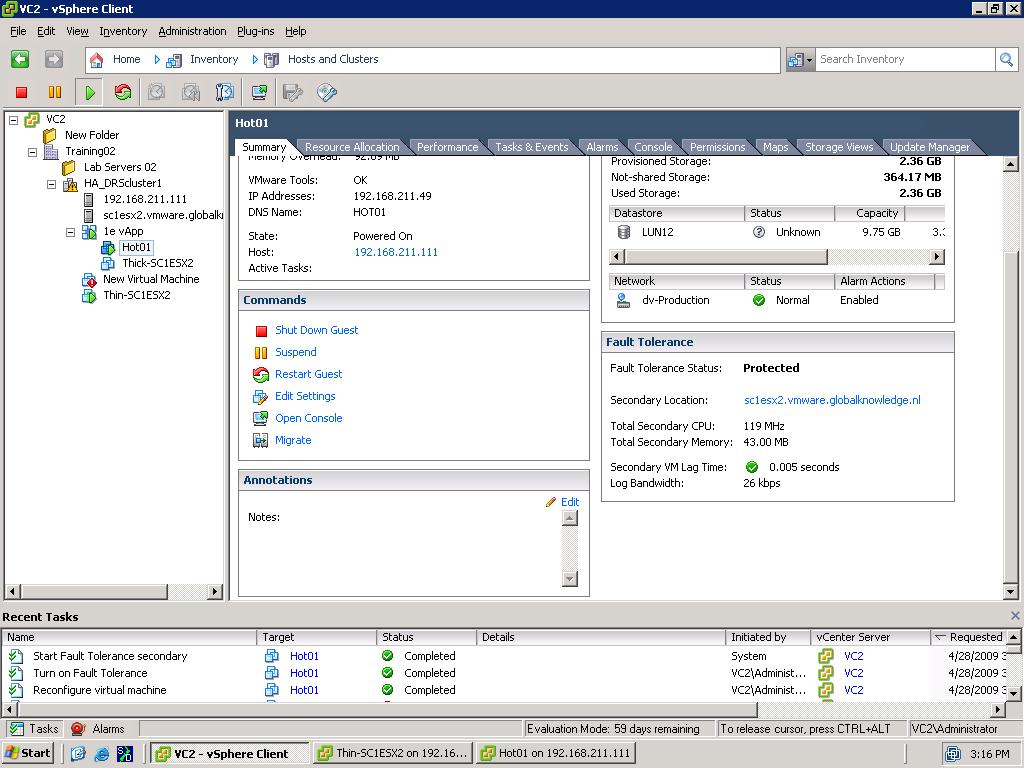
 I delivered my first “vSphere 4 what’s new” training this week. During the last lab, the students managed to configure VMware Fault Tolerance. After powering down one of the ESX servers the protected virtual machine switched over to the second ESX server. FT works fabulous, you can use the following checklist to make sure you configure FT the right way.
Tuesday, April 28. 2009
Fault Tolerance Checklist
I delivered my first “vSphere 4 what’s new” training this week. During the last lab, the students managed to configure VMware Fault Tolerance. After powering down one of the ESX servers the protected virtual machine switched over to the second ESX server. FT works fabulous, you can use the following checklist to make sure you configure FT the right way.
Fault Tolerance Checklist
Required ESX/ESXi Hardware: Ensure that the processors are supported: AMD Barcelona+, Intel Penryn+ (run the CPU compatibility tool to determine compatibility).
Required ESX/ESXi Hardware: Ensure that HV (Hardware Virtualization) is enabled in the BIOS.
Optional ESX/ESXi Hardware: Ensure that power management (also known as power-capping) is turned OFF in the BIOS (performance implications).
Optional ESX/ESXi Hardware: Ensure that hyper-threading is turned OFF in the BIOS (performance implications).
Required Storage: Ensure that FT protected virtual machines are on shared storage (FC, iSCSI or NFS). When using NFS, increase timeouts and have a dedicated NIC for NFS traffic.
Required Storage: Ensure that the datastore is not using physical RDM (Raw Disk Mapping). Virtual RDM is supported.
Required Storage: Ensure that there is no requirement to use Storage VMotion for VMware FT VMs since Storage VMotion is not supported for VMware FT VMs.
Required Storage: Ensure that NPIV (N-Port ID Virtualization) is not used since NPIV is not supported with VMware FT.
Optional Storage: Ensure that virtual disks on VMFS3 are thick-eager zeroed (thin or sparsely allocated will be converted to thick-eager zeroed when VMware FT is enabled requiring additional storage space).
Optional Storage: Ensure that ISOs used by the VMware FT protected VMs are on shared storage accessible to both primary and secondary VMs (else errors reported on secondary as if there is no media, which might be acceptable).
Optional Network: Ensure that at least two NICs are used (NIC teaming) for ESX management/VMotion and VMware FT logging. VMware recommends four VMkernel NICs: two dedicated for VMware VMotion and two dedicated for VMware FT.
Required Network: Ensure that at least gigabit NICs are used (10 Gbit NICs can be used as well as jumbo frames enabled for better performance).
Optional Redundancy: Ensure that the environment does not have a single point of failure (i.e. use NIC teaming, multiple network switches, and storage multipathing).
Required vCenter Server: Ensure that the primary and secondary ESX hosts and virtual machines are in an HA-enabled cluster.
Required vCenter Server: Ensure that there is no requirement to use DRS for VMware FT protected virtual machines; in this release VMware FT cannot be used with VMware DRS (although manual VMotion is allowed).
Required vCenter Server: Ensure that host certificate checking is enabled (enabled by default) before you add the ESX/ESXi host to vCenter Server.
Required ESX/ESXi: Ensure that the primary and secondary ESX/ESXi hosts are running the same build of VMware ESX/ESXi.
Required Virtual Machines: Ensure that the virtual machines are NOT using more than 1 vCPU (SMP is not supported).
Required Virtual Machines: Ensure that there is no user requirement to use NPT/EPT (Nested Page Tables/Extended Page Tables) since VMware FT disables NPT/EPT on the ESX host.
Required Virtual Machines: Ensure that there is no user requirement to hot add or remove devices since hot plugging devices cannot be done with VMware FT.
Required Virtual Machines: Ensure that there is no user requirement to use USB (USB must be disabled) and sound devices (must not be configured) since these are not supported for ecord/Replay (and VMware FT).
Required Virtual Machines: Ensure that there is no user requirement to have virtual machine snapshots since these are not supported for VMware FT. Delete snapshots from existing virtual machines before protecting with VMware FT.
Required Virtual Machines: Ensure that virtual machine hardware is upgraded to v7.
Optional Virtual Machines: Ensure that there are will be no more than four (to eight) VMware FT enabled virtual machine primaries or secondaries on any single ESX/ESXi host (suggested general guideline based on ESX/ESXi host and VM size and workloads which can vary).
Required Guest OS: Ensure that the virtual machines do not use a paravirtualized guest OS.
Required 3rd Party: Ensure MSCS clustered virtual machines will have MSCS clustering removed prior to protecting with VMware FT (and make sure that the virtual machines are not SMP).