When you’re running a Virtual Machine in a production environment and want to perform some tests on it but don’t have enough time or space on your Datastores to create a full hot clone, there’s an alternative.
vSphere 4.0 supports linked virtual machines, which are two or more virtual machines that share storage. Linked virtual machines support efficient sharing of duplicated data. In its simplest form, shared storage is achieved through the use of delta disk backings. A delta disk backing is a virtual disk file that sits on top of a standard virtual disk backing file. Each time the guest operating system on a virtual machine writes to disk, the data is written to the delta disk.
Each time the guest operating system on a virtual machine reads from disk, the virtual machine first targets the disk block in the delta disk. If the data is not on the delta disk, the virtual machine looks for them on the base disk.
Linked virtual machines can be created from a snapshot or from the current running point. After you create a virtual machine, they share the base disk backing and each virtual machine has its own delta disk backing. You can have up to eight virtual machines in a linked virtual machine group. The virtual machines in the group cannot be part of a VMware HA cluster.
Hal Rottenberg is the author of the New-LinkedClone.ps1 PowerShell script, it’s adapted from a technique published originally by Keshav Attrey. Also see William Lam's Perl script and Leo's manual version for ESX 3.5 but I believe, back in 2007 I was one of the first to discover this technique.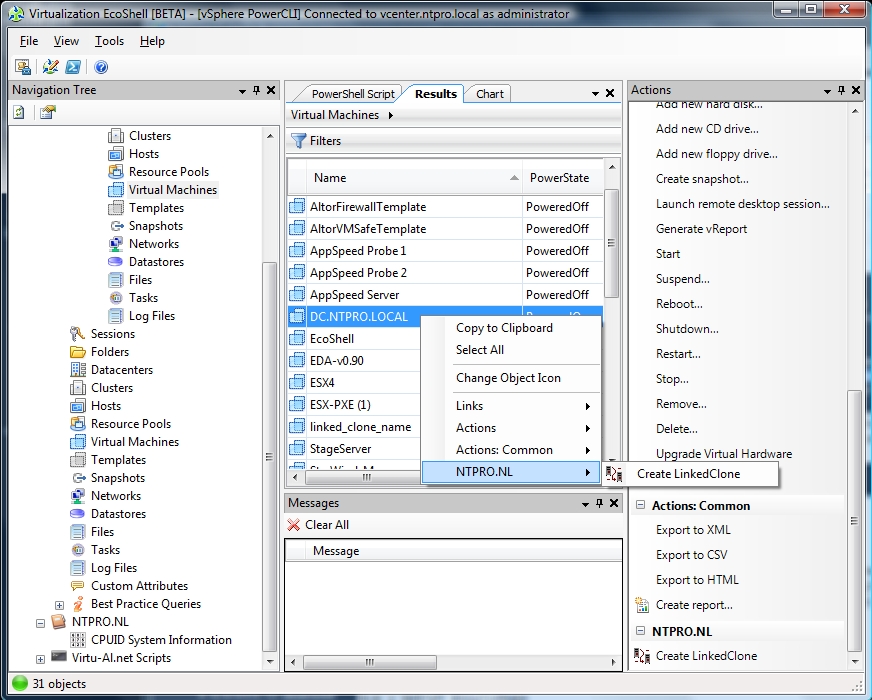 I’ve made some little modifications in Hal’s script and added it as a Script Action to the Virtualization EcoShell by clicking “Add new item” in the actions menu on the right side of the EcoShell console. This enables you to specify a script performing the Action. When you click an Action, objects currently selected in the grid are piped into the script. The LinkedClones Script Action is part of the newest version (1.08) of the NTPRO.NL PowerPack, you can get a copy here. The screen shot shows you how it works.
Update: Alan Renouf has emailed me a link to an interesting knowledge base article regarding Virtual machines from a single disk chain may only run on 8 hosts (VMFS).