• Skip to site navigation
  • Skip to blog entries
  • Skip to archive page
  • Skip to right sidebar

The vmClient 4.0 is released

NTPRO.NL - Eric Sloof

  • NTPRO.NL
  • Online Training
  • VMworld
  • Videos
  • Tools
  • iTunes
  • About

Tuesday, 9 March 2010

The vmClient 4.0 is released

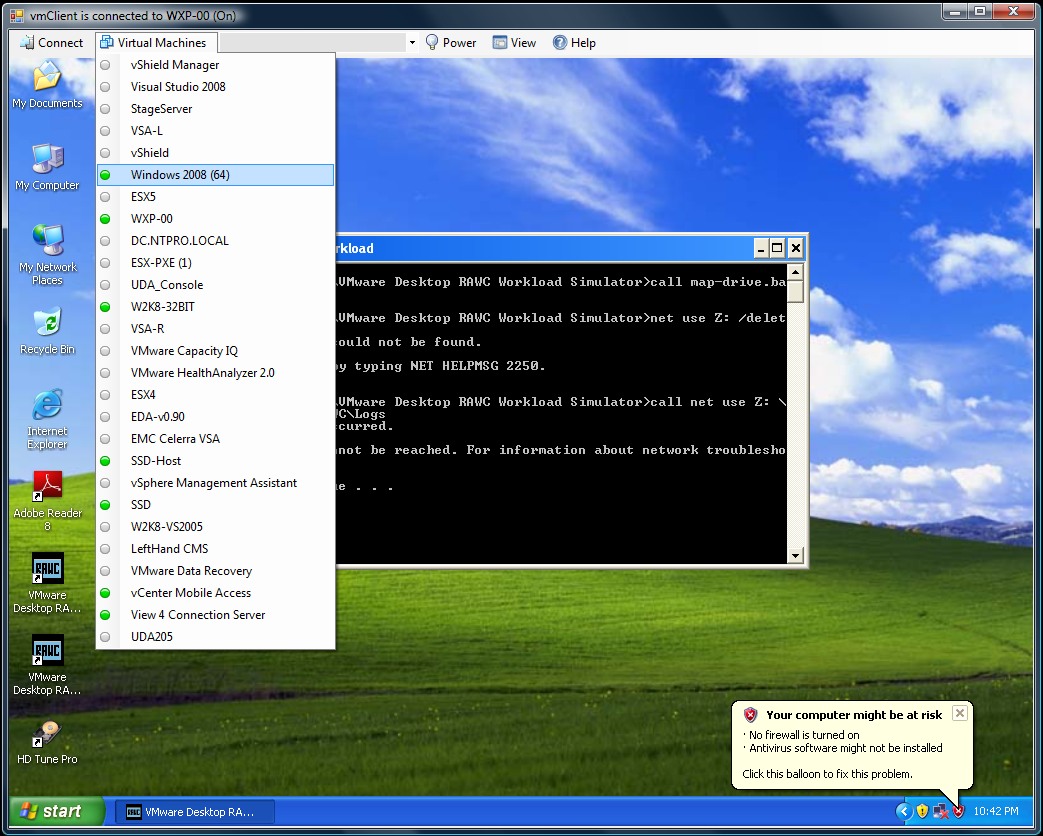
Eric Sloof just launched the vmClient 4.0 The vmClient is a lightweight tool which enables you to control the power of your virtual machines, it’s also capable of presenting the MKS console of your virtual machines. Before you can use the vmClient, you have to install the vSphere client on the same system. After starting the vmClient, you can logon to your vCenter server or individual ESX4 or ESX4i host. A list with available virtual machines will be presented after choosing the Virtual Machines menu item, you can also easily identify the power state of the virtual machines. Grey is powered off, green is powered on, yellow is suspended and red indicates that the virtual machine has an alarm. When you’re working in an RDP session there’s a menu item which can generate a Ctrl-Alt-Del in the guest OS instead of pressing Ctrl-Alt-Ins. The vmClient can run without borders in borderless mode. The menu bar has an option to search for virtual machines, just type in the first characters of your virtual machine name and the list will be filtered. 

The number of virtual machines can be too high to fit in the “Virtual Machine” menu item so I’ve added an extra option to disable this menu and use the search menu instead. The option to customize the user interface of the vmClient can be done by changing a few registry settings. You’re able to show or hide menu items using this hive.

 HKEY_CURRENT_USER\Software\VB and VBA Program Settings\NTPRO.NL\vmClient

You can also pre-select a default virtual machine in this hive. There are two recorded demo sessions available, one which show a walkthrough and a second which shows how to convert the vmClient into a VDI client. The trail version is limited to a maximum number of 50 virtual machines and shows a splash screen with my picture in it. The registered version can be bought online and has no virtual machine limit, you can also get rid of the splash screen. :-) The Buy Now link is available in the help menu. If you have any ideas or suggestions on improving the vmClient or you’ve found a bug, you know where to reach me. Have fun with it.

How to convert the vmClient into a VDI client

A general walkthrough

The vmClient 4.0 can be downloaded from this location: http://vmclient.nl/

Posted by
Eric Sloof
in Products, Tools, VM MKS Client, vmClient, VMware, vSphere at 13:31 | 5 Comments | 1 Trackback
Bookmark and Share
Trackbacks
Trackback specific URI for this entry
Eric Sloof Releases a New Virtualization Tool - vmClient
Well known virtualization expert and blogger from the Netherlands is back at it again, developing and releasing yet another interesting tool into the virtualization community. The latest tool is valled vmClient.
Weblog: VMblog.com - Virtualization Technology News and Information for Everyone
Tracked: Mar 11, 14:35
Comments
Display comments as (Linear | Threaded)
What does this add to the normal infra structure client?
#1 Sjaak (Homepage) on 2010-03-10 11:26 (Reply)
Awesome tool! Is there a way to have the VMs appear alphabetically in the Virtual Machines drop down list?
#2 tWiZzLeR on 2010-03-11 17:23 (Reply)
It would be nice if this tool could run without the vSphere client. I can imagine VSPP hosters distributing this tool to their customers, giving them a lightweight tool to handle their VMs without using the vSphere client, which might be too complex for the less-IT minded customers.
#3 Raymond (Homepage) on 2010-03-19 08:25 (Reply)
Just did a bare minimum protocol debugging of VMware MKS protocol Here are my observations: http://thekissinglink.blogspot.com/2010/06/steps-for-debugging-vmware-mks-vnc.html
#4 VMware Hacker (Homepage) on 2010-06-25 14:39 (Reply)
What is required to run this I installed vsphere client and have .net 2 and 3 installed but get an error. Assembly system.core version 3.5.0.0 be installed in teh Global Assembly Cache (GAC)first.
#5 Anonymous on 2010-07-07 05:07 (Reply)
Add Comment
Standard emoticons like :-) and ;-) are converted to images.
E-Mail addresses will not be displayed and will only be used for E-Mail notifications.

To prevent automated Bots from commentspamming, please enter the string you see in the image below in the appropriate input box. Your comment will only be submitted if the strings match. Please ensure that your browser supports and accepts cookies, or your comment cannot be verified correctly.
CAPTCHA


Submitted comments will be subject to moderation before being displayed.


Twitter RSS FeedLinkedIn

www.hetesambal.nl

Veeam Webinar with Doug Hazelman: 5 Steps to Successful Backup & Replication for Hyper-V! Watch it now >>

Recent Entries

Storage Design and Implementation in vSphere 5.0 - The Rough Cuts
Thursday, January 19 2012
Top 25 Free Tools for VMware vSphere presented by David Davis and Kendrick Coleman
Monday, January 16 2012
LG Android running VMware Horizon Mobile hands-on
Saturday, January 14 2012
Forbes Guthrie has released the vSphere 5 vReference Card
Thursday, January 12 2012
VMworld Session - VMware vMotion in VMware vSphere 5: Architecture, Performance & Best Practices
Wednesday, January 11 2012
Voice Over IP (VoIP) Performance Evaluation on VMware vSphere 5.0
Tuesday, January 10 2012
VMware vCloud Director 1.5 Performance and Best Practices
Monday, January 9 2012
VMware vCenter Site Recovery Manager 5.0 Performance and Best Practices
Sunday, January 8 2012
New Training - VMware vSphere 5 Design Workshop
Saturday, January 7 2012
New Training - VMware View 5 Install, Configure and Manage
Friday, January 6 2012

Archive

  • February 2012 (3)
  • January 2012 (23)
  • December 2011 (21)
  • November 2011 (24)
  • October 2011 (27)
  • September 2011 (26)
  • August 2011 (35)
  • July 2011 (26)
  • June 2011 (15)
  • May 2011 (20)
  • April 2011 (22)
  • March 2011 (22)
  • February 2011 (18)
  • January 2011 (13)
  • December 2010 (23)
  • November 2010 (18)
  • October 2010 (31)
  • September 2010 (22)
  • August 2010 (23)
  • July 2010 (19)
  • June 2010 (19)
  • May 2010 (19)
  • April 2010 (20)
  • March 2010 (23)
  • February 2010 (22)
  • January 2010 (30)
  • December 2009 (37)
  • November 2009 (29)
  • October 2009 (27)
  • September 2009 (36)
  • August 2009 (35)
  • July 2009 (35)
  • June 2009 (43)
  • May 2009 (35)
  • April 2009 (56)
  • March 2009 (51)
  • February 2009 (69)
  • January 2009 (69)
  • December 2008 (60)
  • November 2008 (56)
  • October 2008 (49)
  • September 2008 (63)
  • August 2008 (44)
  • July 2008 (54)
  • June 2008 (26)
  • May 2008 (34)
  • April 2008 (27)
  • March 2008 (38)
  • February 2008 (29)
  • January 2008 (35)
  • December 2007 (24)
  • November 2007 (23)
  • October 2007 (20)
  • September 2007 (54)
  • August 2007 (15)
  • July 2007 (22)
  • June 2007 (13)
  • May 2007 (8)
  • April 2007 (20)
  • March 2007 (10)
  • Recent...
  • Older...
Based on the s9y Bulletproof template framework
Powered by s9y – Template by Bulletproof development team.
  • NTPRO.NL
  • Online Training
  • VMworld
  • Videos
  • Tools
  • iTunes
  • About