• Skip to site navigation
  • Skip to blog entries
  • Skip to archive page
  • Skip to right sidebar

Zenoss Announces Free Tool for VMware Power Users with Esxtop

Eric Sloof - NTPRO.NL

  • NTPRO.NL
  • Online Training
  • VMworld
  • Videos
  • Tools
  • iTunes
  • About

Wednesday, 27 October 2010

Zenoss Announces Free Tool for VMware Power Users with Esxtop

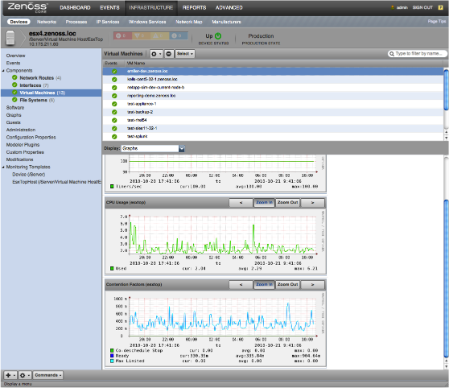
Zenoss has announced that it is now offering a free ZenPack for monitoring the performance of VMware ESX/ESXi servers. Similar to the Unix "Top" command, this ZenPack uses the VMware resxtop command to aggregate and alert on performance metrics in a single graphical view in order to provide administrators an expanded and deeper VMware ESX/ESXi monitoring experience. With this ZenPack, Zenoss is the first to enable proactive VMware management using esxtop.

VMware’s esxtop is a very powerful VMware administrator’s tool used to obtain a snapshot of the current server state.  It not only provides metrics but give you visibility to issues such as disk latency, CPU contentions, memory over commits, etc. VMware administrators have until now used esxtop at the command line to access host server performance metrics.

Virtualization administrators, while enjoying the power of the esxtop command, have been looking for enhancements to help simplify and improve performance troubleshooting. Currently the command must be executed through the command line interface and provides no capability for reporting or alerting. Historical data analysis and graphing requires users to manually redirect data to a file for further offline analysis and charting.

The new ZenPack for esxtop enables the following:

• Performance metrics from ESX and ESXi servers are automatically captured, graphed, displayed, and continually updated in one graphical interface.
• Users can set thresholds and exception alerting based on performance metrics and events as they occur.
• Historical data is saved for in-depth root cause analysis.  

“As we have been working with organizations to provide deep VMware monitoring capabilities, we saw some of our customers and community members using the esxtop command. Unfortunately, this tool was somewhat hidden and only available for power users.  We are combining the strength and ease of use of Zenoss with the esxtop command to provide a simpler monitoring capability for VMware ESX environments,” said Simon Jakesch, Engineer at Zenoss. “With this free ZenPack, users can easily identify performance problems in their ESX and ESXi environment, and immediately take steps to resolve the issues before they affect the business. This capability will save administrator time and increase accessibility to a very powerful performance tool.”

ZenPacks are software extensions to Zenoss. The ZenPack for esxtop is free. For more information on how to download the ZenPack, visit the Zenoss blog. For a complete list of all the ZenPacks that are available, please visit: http://community.zenoss.org/community/zenpacks.


Posted by
Eric Sloof
in Tools at 08:52 | No comments | No Trackbacks
Bookmark and Share
Trackbacks
Trackback specific URI for this entry
No Trackbacks
Comments
Display comments as (Linear | Threaded)
No comments
Add Comment
Standard emoticons like :-) and ;-) are converted to images.
E-Mail addresses will not be displayed and will only be used for E-Mail notifications.

To prevent automated Bots from commentspamming, please enter the string you see in the image below in the appropriate input box. Your comment will only be submitted if the strings match. Please ensure that your browser supports and accepts cookies, or your comment cannot be verified correctly.
CAPTCHA


Submitted comments will be subject to moderation before being displayed.


Twitter RSS FeedLinkedIn

www.hetesambal.nl

Veeam Webinar with Doug Hazelman: 5 Steps to Successful Backup & Replication for Hyper-V! Watch it now >>


Recent Entries

Video - Configure vSphere SRM Replication for a Single VM
Thursday, February 2 2012
VMware Project Onyx for vSphere 5
Wednesday, February 1 2012
Video - Configure ESXi host swapping to a solid-state disk
Sunday, January 29 2012
New Book - The Official VCP5 Certification Guide
Saturday, January 28 2012
Video - VMware vCenter Infrastructure Navigator - Install and Configure
Friday, January 27 2012
Video - Installing vCenter Server 5.0 - Quick Start
Thursday, January 26 2012
Video - VMware vCenter Operations Manager 5.0 - Install and Configure
Wednesday, January 25 2012
VMware vCenter Operations 5.0 - Introduction Video
Tuesday, January 24 2012
What happens to resource pools when vCenter goes down?
Monday, January 23 2012
Video - vCloud Director 1.5 - Quick Start
Sunday, January 22 2012

Archive

  • February 2012 (16)
  • January 2012 (22)
  • December 2011 (21)
  • November 2011 (24)
  • October 2011 (27)
  • September 2011 (26)
  • August 2011 (35)
  • July 2011 (26)
  • June 2011 (15)
  • May 2011 (20)
  • April 2011 (22)
  • March 2011 (22)
  • February 2011 (18)
  • January 2011 (13)
  • December 2010 (23)
  • November 2010 (18)
  • October 2010 (31)
  • September 2010 (22)
  • August 2010 (23)
  • July 2010 (19)
  • June 2010 (19)
  • May 2010 (19)
  • April 2010 (20)
  • March 2010 (23)
  • February 2010 (22)
  • January 2010 (30)
  • December 2009 (37)
  • November 2009 (29)
  • October 2009 (27)
  • September 2009 (36)
  • August 2009 (35)
  • July 2009 (35)
  • June 2009 (43)
  • May 2009 (35)
  • April 2009 (56)
  • March 2009 (51)
  • February 2009 (69)
  • January 2009 (69)
  • December 2008 (60)
  • November 2008 (56)
  • October 2008 (49)
  • September 2008 (63)
  • August 2008 (44)
  • July 2008 (54)
  • June 2008 (26)
  • May 2008 (34)
  • April 2008 (27)
  • March 2008 (38)
  • February 2008 (29)
  • January 2008 (35)
  • December 2007 (24)
  • November 2007 (23)
  • October 2007 (20)
  • September 2007 (54)
  • August 2007 (15)
  • July 2007 (22)
  • June 2007 (13)
  • May 2007 (8)
  • April 2007 (20)
  • March 2007 (10)
  • Recent...
  • Older...
Based on the s9y Bulletproof template framework
Powered by s9y – Template by Bulletproof development team.
  • NTPRO.NL
  • Online Training
  • VMworld
  • Videos
  • Tools
  • iTunes
  • About