• Skip to site navigation
  • Skip to blog entries
  • Skip to archive page
  • Skip to right sidebar

Replicate Technologies | Replicate Datacenter Analyzer 1.0

NTPRO.NL - Eric Sloof

  • NTPRO.NL
  • Online Training
  • VMworld
  • Videos
  • Tools
  • iTunes
  • About

Saturday, 8 November 2008

Replicate Technologies | Replicate Datacenter Analyzer 1.0

Fix faults before they turn into alarms Last Friday Rich Miller informed me about the upcoming release of the Replicate Datacenter Analyzer. Rich joined Replicate Technologies as its CEO in October 2007. Together with Ken Novak and Rich Pelavin, the company's co-founders, he is directing RT's efforts to deliver a new class of management technology for the networks that support virtual machine environments.

The past few weeks at Replicate Technologies have been a combination of intense concentration and confident, regular progress.  It's a real tribute to the team and the  development process that everything has been showing up on time, and with the highest quality.  We can now state categorically that we have a product.  We're quite pleased with the outcome.  The first-customer-ship (FCS) version of the Replicate Datacenter Analyzer (RDA 1.0) arrived on schedule.  The new website is up, and includes the first of a set of short webcasts to provide introductions and tutorials.  We've instituted an "early access" program, limited to a modest set of users, in order to test out our back office and support processes. Based on our experience so far, we should be in full commercial availability as scheduled next week.
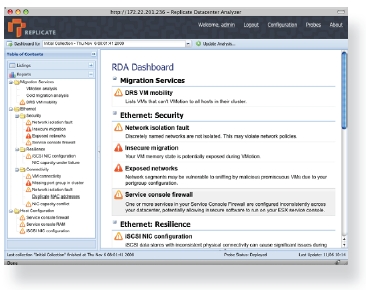
Replicate Datacenter Analyzer (RDA)Replicate Datacenter Analyzer enables a new mode of datacenter management – Predictive Fault management. By taking advantage of the dynamic nature and malleability of virtualization, Replicate Datacenter Analyzer instruments and ana¬lyzes the behavior of the entire unified datacenter. Instead of waiting for failures and then scrambling to restore service, with RDA datacenter administrators can proactively discover errors in the datacenter and resolve them on a schedule of their own choosing. Once identified, RDA’s prescriptive guidance makes fixing potential future faults quick and easy. Watch how you can use RDA to quickly find latent configuration problems in your datacenter.  Utilizing our advanced discovery, RDA maps out your entire topology, identifying issues that prevent VMotion and DRS in advance, while providing you detailed diganostic drill-downs so you can quickly remediate any issues.

Get up and running in under 30 min from start to finish.  Deployed as a virtual appliance, getting RDA installed and running is fast and easy.  With built-in automated probe provisioning, discovery, and analysis, you can start getting results almost immediatly.  RDA's intuitive AJAX UI works with all major browsers, and includes all the guidance you need to start using RDA.

Highlights

  • Expert Guidance: RDA enhances your knowledge and productivity by giving you the expertise and guidance you need to avoid and swiftly remediate configuration problems that could impact your operations.
  • Preventive Analysis: RDA assesses your entire datacenter infrastructure to uncover latent and overt configuration problems of resiliency, capacity, security and connectivity. Our holistic analysis is based on a growing suite of innovative diagnostic modules incorporating industry's configuration best practices and analysis in key functional areas such as layer 2 networking, ISCSI, and live virtual machine migration.
  • Verified Results: RDA compares configurations gathered from your existing system management tools with its own active discovery to provide insights into your as-deployed configuration.
  • Dashboard: RDA offers a comprehensive health-check of your datacenter configuration at one glance, so you can keep track of your volatile virtualized environment. Our dashboard draws your attention to essential items for quick remediation.
  • Leverage your Investment: Unlike other products, RDA seamlessly works with your favorite management systems, leveraging and extending the value of your current processes, tools, and systems.
  • Value out-of-the-Box: RDA is conveniently delivered as a virtual appliance. It is quick and easy to deploy. You will gain valuable insight into your datacenter infrastructure within minutes of initiating operation.
  • Subscription Model: RDA subscription includes everything you need to be successful in one package: licenses, service and support and ongoing product updates.
Posted by
Eric Sloof
in Tools at 14:03 | No comments | No Trackbacks
Bookmark and Share
Trackbacks
Trackback specific URI for this entry
No Trackbacks
Comments
Display comments as (Linear | Threaded)
No comments
Add Comment
Standard emoticons like :-) and ;-) are converted to images.
E-Mail addresses will not be displayed and will only be used for E-Mail notifications.

To prevent automated Bots from commentspamming, please enter the string you see in the image below in the appropriate input box. Your comment will only be submitted if the strings match. Please ensure that your browser supports and accepts cookies, or your comment cannot be verified correctly.
CAPTCHA


Submitted comments will be subject to moderation before being displayed.


Twitter RSS FeedLinkedIn

www.hetesambal.nl

Veeam Webinar with Doug Hazelman: 5 Steps to Successful Backup & Replication for Hyper-V! Watch it now >>

Recent Entries

Storage Design and Implementation in vSphere 5.0 - The Rough Cuts
Thursday, January 19 2012
Top 25 Free Tools for VMware vSphere presented by David Davis and Kendrick Coleman
Monday, January 16 2012
LG Android running VMware Horizon Mobile hands-on
Saturday, January 14 2012
Forbes Guthrie has released the vSphere 5 vReference Card
Thursday, January 12 2012
VMworld Session - VMware vMotion in VMware vSphere 5: Architecture, Performance & Best Practices
Wednesday, January 11 2012
Voice Over IP (VoIP) Performance Evaluation on VMware vSphere 5.0
Tuesday, January 10 2012
VMware vCloud Director 1.5 Performance and Best Practices
Monday, January 9 2012
VMware vCenter Site Recovery Manager 5.0 Performance and Best Practices
Sunday, January 8 2012
New Training - VMware vSphere 5 Design Workshop
Saturday, January 7 2012
New Training - VMware View 5 Install, Configure and Manage
Friday, January 6 2012

Archive

  • February 2012 (3)
  • January 2012 (23)
  • December 2011 (21)
  • November 2011 (24)
  • October 2011 (27)
  • September 2011 (26)
  • August 2011 (35)
  • July 2011 (26)
  • June 2011 (15)
  • May 2011 (20)
  • April 2011 (22)
  • March 2011 (22)
  • February 2011 (18)
  • January 2011 (13)
  • December 2010 (23)
  • November 2010 (18)
  • October 2010 (31)
  • September 2010 (22)
  • August 2010 (23)
  • July 2010 (19)
  • June 2010 (19)
  • May 2010 (19)
  • April 2010 (20)
  • March 2010 (23)
  • February 2010 (22)
  • January 2010 (30)
  • December 2009 (37)
  • November 2009 (29)
  • October 2009 (27)
  • September 2009 (36)
  • August 2009 (35)
  • July 2009 (35)
  • June 2009 (43)
  • May 2009 (35)
  • April 2009 (56)
  • March 2009 (51)
  • February 2009 (69)
  • January 2009 (69)
  • December 2008 (60)
  • November 2008 (56)
  • October 2008 (49)
  • September 2008 (63)
  • August 2008 (44)
  • July 2008 (54)
  • June 2008 (26)
  • May 2008 (34)
  • April 2008 (27)
  • March 2008 (38)
  • February 2008 (29)
  • January 2008 (35)
  • December 2007 (24)
  • November 2007 (23)
  • October 2007 (20)
  • September 2007 (54)
  • August 2007 (15)
  • July 2007 (22)
  • June 2007 (13)
  • May 2007 (8)
  • April 2007 (20)
  • March 2007 (10)
  • Recent...
  • Older...
Based on the s9y Bulletproof template framework
Powered by s9y – Template by Bulletproof development team.
  • NTPRO.NL
  • Online Training
  • VMworld
  • Videos
  • Tools
  • iTunes
  • About