On January 21th, 2010 the 16th edition of the Tech Data and Azlan partner event will take place at the Home Boxx Exhibition Center Nieuwegein. This Partner Event has become an annual event, with over 60 leading ICT suppliers and over 2000 resellers and is the only ICT exhibition with a unique design, full of information and entertainment.
My session will show you how to Accelerate Deployment of the Private Cloud with Vblock Infrastructure Packages. You can still signup here to reserve your free entrance ticket.
Monday, 11 January 2010
I’ll be presenting at the Tech Data - Azlan Partner Event 2010
Thursday, 7 January 2010
Hidden tool: vmware-vimdump
After a second or 10 you’ll see the following output, followed by every property you can think of:
=~=~=~=~=~=~=~=~=~=~=~= PuTTY log 2010.01.07 21:41:38 =~=~=~=~=~=~=~=~=~=~=~=
./vmware-vimdump
Connecting to : localhost at 443 as root over SOAP
Found 67 managed objects:
1. vim.AuthorizationManager::ha-authmgr
2. vim.ComputeResource::ha-compute-res
3. vim.Datacenter::ha-datacenter
4. vim.Datastore::192.168.178.80:/nfs/public
5. vim.Datastore::496b4b2d-eb377ae5-3a0e-00151798bd3c
6. vim.Datastore::49f35375-879d840a-4a6c-00151798bd3d
7. vim.Datastore::4a1aa279-c94107ae-790a-00151798bd3c
8. vim.DiagnosticManager::ha-diagnosticmgr Continue reading "Hidden tool: vmware-vimdump" »
Tuesday, 22 December 2009
Virtualization EcoShell: Uncover the Hidden Challenges of Daily VM Administration w/ Scott Herold
Virtualization EcoShell is a freeware desktop application that enables IT administrators to unlock the full potential of their virtual infrastructure and reduce the daily operating costs of managing multi-platform environments. Virtualization EcoShell contains over 250 pre-built scripts to help administrators identify and resolve configuration and management challenges in their environment while providing daily cost-saving opportunities.
Ready to unlock the full potential of their virtual infrastructure and reduce the daily operating costs of managing multi-platform environments? Join Scott Herold, Lead Architect for Virtualization Solutions at Vizioncore, as he highlights the key best-practices of daily management and highlights the flexibility of Virtualization EcoShell.
Friday, 18 December 2009
How to upgrade Alan Renouf’s Virtualization EcoShell PowerPack Version 3
Alan Renouf has just released version 3 of his Virtualization EcoShell PowerPack and it contains some great new features. In its short existence Alan’s PowerPack has already been downloaded over 2500 times. During the Dutch VMUG last Friday, I’ve presented a session which will give you a good insight into working with the Virtualization EcoShell and Alan’s PowerPack. Just to show you how easy it is to upgrade to the newest version, I’ve created a little Jing movie.
Continue reading "How to upgrade Alan ... »Sunday, 22 November 2009
Exporting data to XML with the EcoShell
Currently I’m working very hard on my upcoming Dutch VMUG presentation. While I was testing the demo part which is going to be real cool btw, I discovered a real useful feature in the Virtualization EcoShell. The EcoShell Provides pre-defined and customizable reports as well as automated maps without hassle in HTML, XML and CSV formats, including support for Microsoft Visio. But if you want to hassle with XML, what’s the best way? The example screenshots show how to export a selection of data stores to an XML file and then create an Microsoft Excel Map by importing the XML from the file. Excel really does a good job with creating an XML-based representation objects from the EcoShell. The under laying technique is based on the Export-Clixml cmdlet, it creates an XML-based representation of an object or objects and stores it in a file. You can then use the Import-CLIXML cmdlet to re-create the saved object based on the contents of that file. This cmdlet is similar to ConvertTo-XML, except that Export-Clixml stores the resulting XML in a file. ConvertTo-XML returns the XML, so you can continue to process it in Windows PowerShell.
Friday, 20 November 2009
VMware has released vSphere PowerCLI 4.0 U1
VMware vSphere PowerCLI 4.0 Update 1 has been tested against the beta release of vSphere 4.1. To find the related issues, see Known Issues, Compatibility with VMware vSphere 4.1 Beta.
What's New in This Release?
This release of vSphere PowerCLI 4.0 Update 1 introduces the following new capabilities:
•Managing the failover and load-balancing policies of VirtualSwitch and VirtualPortGroup objects with Get-NicTeamingPolicy and Set-NicTeamingPolicy.
•Copying files in and out of guest operating systems with Copy-VMGuestFile.
•Restarting virtual machines with Restart-VM.
•Managing the power state of hosts using Start-VMHost, Restart-VMHost, Suspend-VMHost, and Stop-VMHost.
•Managing guest networks with Get-VMGuestNetworkInterface, Set-VMGuestNetworkInterface, Get-VMGuestRoute, New-VMGuestRoute, Remove-VMGuestRoute, and Set-VMGuestRoute.
•Retrieving and removing USB devices with Get-UsbDevice and Remove-UsbDevice.
•Managing NIC customization settings with Get-OSCustomizationNicMapping, New-OSCustomizationNicMapping, and Set-OSCustomizationNicMapping.
•Handling virtual machine questions with Get-VMQuestion and Set-VMQuestion.
•Working with host storages and iSCSI HBA devices with Get-VMHostHba, Set-VMHostHba, Get-iScsiHbaTarget, New-iScsiHbaTarget, Remove-iScsiHbaTarget, Set-iScsiHbaTarget, and Set-VMHostStorage.
•Moving templates with Move-Template and Move-Inventory.
•Managing the access control system with Get-VIPrivilege, Get-VIRole, New-VIRole, Remove-VIRole, Set-VIRole, Get-VIPermission, New-VIPermission, Remove-VIPermission, and Set-VIPermission.
•Managing DRS recommendations with Get-DrsRecommendation and Apply-DrsRecommendation.
•Upgrading hosts with Install-VMHostPatch.
•Managing virtual appliances with Get-VApp, Export-VApp, Import-VApp, New-VApp, Remove-VApp, Set-VApp, Start-VApp, and Stop-VApp.
•Managing PCI and SCSI passthrough devices with Add-PassthroughDevice, Get-PassthroughDevice, and Remove-PassthroughDevice.
•Running BAT (Windows) and BASH (Linux) scripts with Invoke-VMScript.
•Granting and revoking shell access with New-VMHostAccount and Set-VMHostAccount.
•Uploading firmware packages with Set-VMHostFirmware.
•Creating virtual machines with thin provisioned disks with New-VM.
•Cloning powered-on virtual machines with New-VM.
•Resizing virtual disks and guest partitions with Set-HardDisk.
•Extending, cloning, inflating, and reallocating virtual hard disks with Copy-HardDisk, New-HardDisk, and Set-HardDisk.
•Managing the host time zones with Get-VMHostAvailableTimeZone and Set-VMHost.
•Working with default Datastore Provider and Inventory Provider drives.
•Working with files and directories in datastores by using the Datastore Provider.
For more information on changes made in vSphere PowerCLI 4.0 Update 1, including deprecations and security enhancements, see the vSphere PowerCLI Change Log.
http://downloads.vmware.com/d/details/sdkwin40u1/ZHcqYmQlcHRiZGVqdA
Monday, 16 November 2009
Project Onyx Alpha Release
Carter Shanklin just released the alpha version of project Onyx trough Twitter and YouTube. Onyx generates PowerShell code to help you solve your toughest automation challenges. See the full demonstration with a complete explanation of how to use Onyx at YouTube. Once you have downloaded Project Onyx (http://blogs.vmware.com/files/onyx_1.5.3607.25516.zip) this video shows you how to use it. I already did some tests and it looks awesome.
Onyx is a standalone application that serves as a proxy between the vSphere Client and the vCenter Server. It monitors the network communication between them and translates it into an executable PowerShell code. Later, this code can be modified and saved into a reusable function or script.
1. To connect to a server, click the "Connect" icon.
2. Enter the IP of the vCenter Server on which you want to work and click Connect.
3. Connect with any of the following clients:
For vSphere Client, in the "IP Address" field enter the following address:
http:// [IP of the machine where Onyx is running] : [listening port]
For vSphere PowerCLI, run the following command:
Connect-VIServer [IP of the machine where Onyx is running] -Protocol http
-Port [listening port] -User [username] -Pass [password]
4. To start the generation of PowerCLI.NET scripts, click the "Start" icon.
5. To save the generated script, click the "Save output to file" icon.
Note: To run the generated script, use VMware vSphere PowerCLI.
Free download at: http://www.vmware.com/go/powercli
Monday, 2 November 2009
Just upgraded the Viru-Al.net VESI PowerPack
Monday, 12 October 2009
PowerWF - New Workflow Project - “SnapshotAge”
James Hofer over at PowerWF has posted his first blog article, it points out how to report the virtual machine snapshot age. He has created a step by step tutorial how to create the PowerWF workflow.
VMware provides a relatively easy way to script virtual machine management using PowerShell with PowerCLI. Unfortunately there is still a significant learning curve for someone with minimal PowerShell experience; not realizing a connection to the virtual center or ESX host is required before executing other commands, or that failure to close that connection in a script leaves the connection open indefinitely can be very frustrating.
Fortunately PowerWF simplifies this process significantly. One problem VMware administrators face is finding old virtual machines snapshots that are wasting storage space. The following example takes advantage of both PowerShell and PowerCLI to find outdated snapshots and email the results. To begin, create a new workflow project named, “SnapshotAge”.
Continue reading "PowerWF - New Workflow ... »Sunday, 11 October 2009
Virtualization EcoShell 1.2 Released
Scott Herold is happy to announce that the 1.2 version of Virtualization EcoShell is officially available for download at TheVESI.org Download Page.
We’ve added several new key features that we will be highlighting on our blog over the next several days! Make sure you you download the newest release and give it a shot! Don’t forget to check back here for tips and tricks on how to use the new features over the next few days!
New in the Virtualization EcoShell 1.2 Release
•Charts Tab allowuing users to graph any information presented in the grid view using various chart formats
•Best Practices Filters allow customers to easly perform daily checks of common misconfigurations
•Custom Attribute Manager allows users to view all custom attributes and quickly modify custom attribute values against multiple entities
•Hyper-V PowerPack allowing administrators to manage indivdual Microsoft Hyper-V installations using PowerShell
The first new feature that stroke my eye was the Chart tab in the Grid. After some customization , I was able to create really cool charts. You can select different types like Area, Column, Doughnut, Line, Scatter, Stacked Area and Stacked Column. The horizontal axes labels hold the category and can be fed by everything that’s measurable. You can also select multiple legend entries.
Monday, 5 October 2009
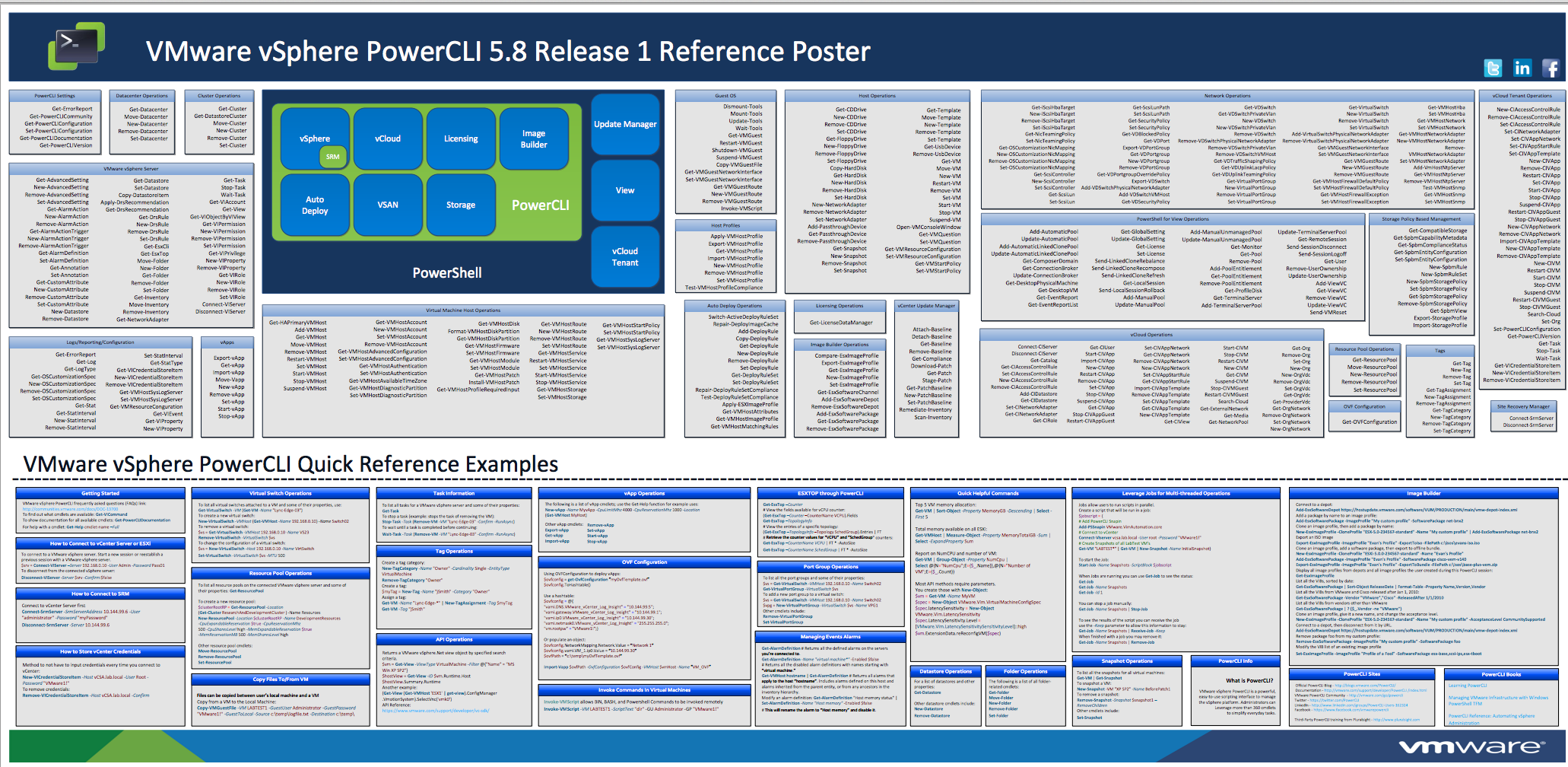
Download and print your PowerCLI commandlets poster
Pablo Roesch : Folks, Our marketing team put together a nice poster with all the PowerCLI commandlets for your enjoyment. We handed some out during VMworld and have a few hardcopies left. Here is a PDF for folks that are interested. Regards, Pablo Download Powercli-poster.
http://blogs.vmware.com/developer/2009/10/get-your-powercli-poster-on-.html
Friday, 28 August 2009
Virtualization EcoShell 1.2 – New Cool Feature – Charts
You definitely have to attend Scott Herold’s session (DS-16) at the VMware Developer day or Carter Shanklin’s PowerShell session at the VMworld 2009. In those two sessions you might see the new version of the Virtualization EcoShell 1.2 in action. Since I’m not attending but delivering a VMware ICM training instead :-( Scott Herold was kind enough to let me do some pre-testing with version 1.2. The upgrade went smooth. The first new feature that stroke my eye was the Chart tab in the Grid. After some customization , I was able to create really cool charts. You can select different types like Area, Column, Doughnut, Line, Scatter, Stacked Area and Stacked Column. The horizontal axes labels hold the category and can be fed by everything that’s measurable. You can also select multiple legend entries.
Thursday, 27 August 2009
Cool Video from Carter Shanklin - What is Project Onyx?
Onyx generates code to help you solve your toughest automation challenges.
See the full demonstration with a complete explanation of how to use Onyx at VMworld -- session VM2241. Bring your business card if you want to be 1 of ten beta (maybe VMware should make that alpha) testers.
PowerScripter Integration + PowerWF = FTW
In this demo xcud takes a familiar PowerCLI one-liner scraped from a popular PowerCLI blog (http://peetersonline.nl), convert it into a workflow using PowerWF, deploy it to PowerScripter, then call it directly from the vSphere client via PowerScripter. Don’t forget to drop by at the PowerWF booth located at the VMworld New Innovators Pavilion.
Tuesday, 18 August 2009
vDS PowerShell Cmdlets demo?
I’ve stumbled on a great demo created by someone from China, it’s about controlling virtual distributed switches with PowerCLI. I’m trying to contact this (137145shi) guy because he didn’t post a download link or a homepage URL. The only thing I can see in the video is that he’s copying some VDSAutomation.dll files.
We? developed a PowerShell snap-in to manage vSphere vDS , which could help VI admins a lot. This vedio is a demo about vDS management cmdlets implemented in PowerCLI. There are some preliminary vDS cmdlets showed in this demo and they are listed as follows.
1.Get-VDS
2.Get-DVPortgroup
3.New-VDS
4.New-DVPortgroup
5.Add-VDSHost
6.Remove-VDSHost
7.Set-VDS
8.Set-DVPortgroup
9.Remove-VDS
10.Remove-DVPortgroup
update : Here is the supervisor's official response:
"Sorry this tool is still a bit unbaked as of now, hence no download information. In the mean while, you may attend the upcoming VMworld 2009 TA3521 session, where a number of 3rd party and/or open source Virtual Switch/Networking related management and troubleshooting tools are going to be demonstrated and discussed for the first time."