Thursday, February 23. 2012
Nexus 1000V v1.5 Technical Deep Dive
Tuesday, February 21. 2012
Video - Cisco Nexus 1000V v1.5 Installation
Sunday, February 19. 2012
Technical Whitepaper - Network I/O Latency on VMware vSphere 5
Network I/O latency is an important measurement, especially in latency-sensitive applications like those found in industries such as finance and trading, healthcare, transportation, and telecom (in particular, applications using Voice over IP). The end-to-end latency requirements of these applications vary from microseconds to milliseconds. And some of these applications, such as those utilizing Voice over IP, are more sensitive to jitter than end-to-end latency. So an important measurement to consider for vSphere performance in this scope is latency and jitter added due to virtualization.
Packets sent or received from a virtual machine experience some increase in network I/O latency compared to a bare metal (native) environment. This is because packets need to traverse through an extra layer of virtualization stack in the case of virtual machines. The additional latency due to the virtualization stack can come from several different sources. The most commons ones include:
- Emulation Overhead
- Packet Processing
- Scheduling
- Virtual Interrupt Coalescing
- Network Bandwidth Contention
- Halt-Wakeup Physical CPU
- Halt-Wakeup Virtual CPU
VMware designed and ran several performance experiments to show under what conditions the different sources of latency become dominant and how they affect end-to-end latency. The results will help you make proper design choices for your environment such that it fulfills your end-to-end latency requirements.
 Network I/O Latency on VMware vSphere 5
Network I/O Latency on VMware vSphere 5Saturday, February 18. 2012
Video - Scripted ESXi Installation
Friday, February 17. 2012
Options for becoming a VCP 5.0
 VMware's Andy Cary who works as a Senior Technical Trainer in EMEA has received a lot of e-mails recently about what the options are for people to secure their VCP5.0. The table in the diagram below shows the 4 different options for attaining your VCP 5.0 exam. Andy thinks there's confusion with the text in printed orange, this text is only valid until the 29th February. So at the 1st March all the orange options will have disappeared from the diagram.
Here's Andy's explanation regarding the four different layers for achieving a VCP5.0
Option 1 - Just Starting with VMware or VCP 2
Another way of saying this is there is no upgrade path from VCP2 to VCP5 and the student hasn’t attend any vSphere 4.0 or 5.0 classes. So in this case the student must attend a vSphere 5.0 qualifying class = vSphere 5 Install Configure and Manage or vSphere 5 Fasttrack and take the VCP5.0 – no deadline for when they have to take the exam
Option 2 - Currently a VCP3
So now if a student is a VCP3 they can take the VCP5.0 exam if:-
1. Attend the vSphere 5.0 What’s New class and take the VCP 5.0 exam by the 29th February – they won’t be able to take the exam after 29th February if this the only training they have attended.
2. Attend vSphere 5 Install Configure and Manage or vSphere 5 Fasttrack and take the VCP5.0 exam – there is no deadline for when they have to take the VCP5.0 exam
Option 3 - Currently a VCP4.0
Go take the VCP5.0 exam by 29th February. If a student in this situation wants to become a VCP5.0 after the 29th Feb they have to attend a vSphere 5.0 What’s New class.
Option 4 - No VCP Certification but have completed one of the VCP4 qualifying classes
In this example a student has attend let’s say the vSphere 4.x ICM class but they haven’t passed any VCP exams.
1. A student will be allowed to take the VCP4.0 exam and then VCP5.0 exam to get the VCP5.0 BUT they must pass the VCP5.0 exam by the 29th February
2. A student will also be allowed to take their VCP5.0 exam (without taking VCP4.0) if they have attend the vSphere 5.0 What’s New class – again no deadline for taking the VCP5.0 exam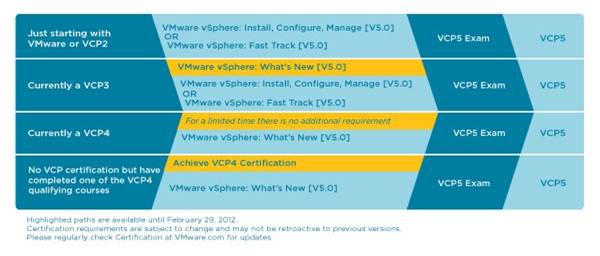
So if student in this situation passes their VCP4 exam today, they must pass their VCP5.0 exam by the end of February. If they don’t pass by 29th Feb they are effectively at Option 3 and they have to attend vSphere 5.0 What’s New class
 (Page 2 of 5, totaling 22 entries)

