• Skip to site navigation
  • Skip to blog entries
  • Skip to archive page
  • Skip to right sidebar

Building VMware Visual Basic Applications

NTPRO.NL - Eric Sloof

  • NTPRO.NL
  • Online Training
  • VMworld
  • Videos
  • Tools
  • iTunes
  • About

Tuesday, 24 April 2007

Building VMware Visual Basic Applications

VB Application

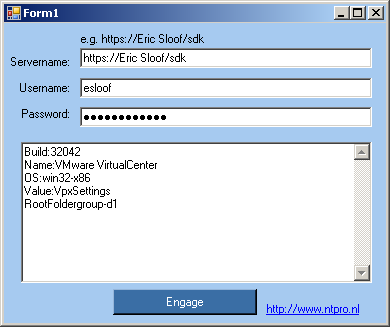
This document describes how to build a VB Application that can communicate with Virtual Center 2.0.1. When you have trouble with copying the source code out of the PDF document you can also download the Form1.txt. You can find some additional information about getting properties from an object in a free sample chapter from the “Scripting VMware Power Tools: Automating Virtual Infrastructure Administration� book. Here is the link to chapter 3.

On April the 25th I received some additional information from Robert Baumstark and my wife corrected the grammar in the PDF document.

Bellow you can find the email message from Rob with some extra tips about using the VIClient.dll.

Actually I believe the example code you've written in there you have no need at all for VIClient.dll. Of those 3 files, VIClient is written entirely by me, though some parts of it aren't much more than VB ports of some of the C# example code. In that DLL there are functions/objects that would replace most of the code in your sample application. The other 2 DLL's I generated and compiled from the VI SDK .WSDL files. I don't know what redistribution restrictions VMWare would put on those files, though since the entire SDK is free I doubt there are any issues with it.

When you're adding references to the project lower down - you only need to add VimService (and optionally VIClient if you want to make use of my code). Whatever you write only ever talks to VimService.DLL - that DLL talks to the XMLSerializers, but since you don't talk to it directly it isn't needed as a reference.

Since there is NO documentation anywhere about the VIClient.DLL - I'll put a little bit in here. I'm basing this on the version of VIClient that I have here - hopefully it's reasonably close to the version that I distributed with the MAC tool.

First off - You'll want to have an instance of the VIClient object that you keep around for the length of your program - I usually make it a private member of the main form of the project.

To connect to VirtualCenter (or an ESX host), you have 2 options. You can call VIClient.Connect(URL, Username, Password), which takes care of a lot of your example code. Or you can create an instance of VIClient.frmLogin. frmLogin.ShowDialog() will pop up a little box prompting for a host to connect to, and a username/password, and will make the connection when you hit the Connect button. Before calling ShowDialog() though, you need to set the frmLogin.aClient to your instance of VIClient.VIClient - that is the client object that will be used to make the connection.

And the final function in there that's really quite handy -

VIClient.GetDynamicProperty(Object as ManagedObjectReference,
PropertyName as String) as ObjectContent()

You can pass any managed object reference and a property name, and it'll return a collection of the results it found.

So..., some example code. (note: all this written right into the e-mail, I haven't test-compiled this, it may have typo's etc)

To duplicate your example program...

Dim X as New VIClient.VIClient

Dim LogonForm as New VIClient.frmLogin

LogonForm.aClient = X

If X.ShowDialog() = DialogResult.OK Then

MsgBox(X.ServiceContent.about.build)

MsgBox(X.ServiceContent.about.name)

MsgBox(X.ServiceContent.about.osType)

MsgBox(X.ServiceContent.setting.Value)

MsgBox(X.ServiceContent.rootFolder.Value)

End If

X.Disconnect()

And an example of grabbing properties. Lets assume that we have a VIClient named X again (already connected and all that) - and another variable VM, which is a managed object reference to some VM.

MsgBox(X.GetDynamicProperty(VM,"config.hardware.numCPU")(0).propSet(0).val) - gets a single value out of the collection of properties returned.

Dim AllHardware() as ObjectContent, aDevice as VirtualDevice

AllHardware = X.GetDynamicProperty(VM, "config.hardware")

For Each aDevice In CType(AllHardware(0).propSet(0).val,
VirtualHardware).device

MsgBox(aDevice.deviceInfo.label)

Next

Also keep in mind there is little to no error handling in VIClient. If an error does occur, it'll just bubble up to your code.

Rob.

Posted by
Eric Sloof
in VMware at 11:46 | 1 Comment | 2 Trackbacks
Bookmark and Share
Trackbacks
Trackback specific URI for this entry
Virtual-Rob went live
On Wednesday, April 25, 2007 something awesome has happened. Robert Baumstark, the creator of the virtual MAC tool has opened his Virtual Rob weblog. Rob is an infrastructure specialist at the Northern Alberta Institute of Technology in Canada where he is
Weblog: Eric Sloof's personal blog
Tracked: Apr 26, 08:48
vmCDConnected revisited
A few weeks ago I started building my first Visual Basic 2005 application. What I wanted to do is talking to the VMware Virtual Center API. I published a PDF document with describes the way how to connect to this API and I released some code fragments. In
Weblog: Eric Sloof's personal blog
Tracked: Jun 13, 10:13
Comments
Display comments as (Linear | Threaded)
I don't want to steal Eric's thunder, but at the same time I do want to be involved in this. So I've created myself a blog where I can publish little things, and receive comments about stuff. http://virtual-rob.blogspot.com/
#1 Rob Baumstark (Homepage) on 2007-04-26 01:32
The author does not allow comments to this entry


Twitter RSS FeedLinkedIn

www.hetesambal.nl

Veeam Webinar with Doug Hazelman: 5 Steps to Successful Backup & Replication for Hyper-V! Watch it now >>

Recent Entries

Storage Design and Implementation in vSphere 5.0 - The Rough Cuts
Thursday, January 19 2012
Top 25 Free Tools for VMware vSphere presented by David Davis and Kendrick Coleman
Monday, January 16 2012
LG Android running VMware Horizon Mobile hands-on
Saturday, January 14 2012
Forbes Guthrie has released the vSphere 5 vReference Card
Thursday, January 12 2012
VMworld Session - VMware vMotion in VMware vSphere 5: Architecture, Performance & Best Practices
Wednesday, January 11 2012
Voice Over IP (VoIP) Performance Evaluation on VMware vSphere 5.0
Tuesday, January 10 2012
VMware vCloud Director 1.5 Performance and Best Practices
Monday, January 9 2012
VMware vCenter Site Recovery Manager 5.0 Performance and Best Practices
Sunday, January 8 2012
New Training - VMware vSphere 5 Design Workshop
Saturday, January 7 2012
New Training - VMware View 5 Install, Configure and Manage
Friday, January 6 2012

Archive

  • February 2012 (3)
  • January 2012 (23)
  • December 2011 (21)
  • November 2011 (24)
  • October 2011 (27)
  • September 2011 (26)
  • August 2011 (35)
  • July 2011 (26)
  • June 2011 (15)
  • May 2011 (20)
  • April 2011 (22)
  • March 2011 (22)
  • February 2011 (18)
  • January 2011 (13)
  • December 2010 (23)
  • November 2010 (18)
  • October 2010 (31)
  • September 2010 (22)
  • August 2010 (23)
  • July 2010 (19)
  • June 2010 (19)
  • May 2010 (19)
  • April 2010 (20)
  • March 2010 (23)
  • February 2010 (22)
  • January 2010 (30)
  • December 2009 (37)
  • November 2009 (29)
  • October 2009 (27)
  • September 2009 (36)
  • August 2009 (35)
  • July 2009 (35)
  • June 2009 (43)
  • May 2009 (35)
  • April 2009 (56)
  • March 2009 (51)
  • February 2009 (69)
  • January 2009 (69)
  • December 2008 (60)
  • November 2008 (56)
  • October 2008 (49)
  • September 2008 (63)
  • August 2008 (44)
  • July 2008 (54)
  • June 2008 (26)
  • May 2008 (34)
  • April 2008 (27)
  • March 2008 (38)
  • February 2008 (29)
  • January 2008 (35)
  • December 2007 (24)
  • November 2007 (23)
  • October 2007 (20)
  • September 2007 (54)
  • August 2007 (15)
  • July 2007 (22)
  • June 2007 (13)
  • May 2007 (8)
  • April 2007 (20)
  • March 2007 (10)
  • Recent...
  • Older...
Based on the s9y Bulletproof template framework
Powered by s9y – Template by Bulletproof development team.
  • NTPRO.NL
  • Online Training
  • VMworld
  • Videos
  • Tools
  • iTunes
  • About