 After Google announced the availability of the Chrome OS / Chromium OS source code, one of GDGT's engineers (Jon Ursenbach), immediately got to work on compiling the code, trying to see if he could get an instance of Chromium OS running in a virtual machine.
He was finally able to do it! You can download a copy of the virtual machine to use in VMware (300MB compressed / 700MB uncompressed): http://gdgt.com/google/chrome-os/download/
Here's my WorksStation 7 VMX file :
.encoding = "windows-1252"
config.version = "8"
virtualHW.version = "6"
maxvcpus = "4"
scsi0.present = "TRUE"
scsi0.virtualDev = "lsilogic"
memsize = "1024"
ide0:0.present = "TRUE"
ide0:0.fileName = "C:\Users\Eric Sloof\Downloads\Chrome\chrome-os-0.4.22.8-gdgt.vmdk"
ide1:0.present = "TRUE"
ide1:0.autodetect = "TRUE"
ide1:0.deviceType = "cdrom-raw"
floppy0.startConnected = "FALSE"
floppy0.fileName = ""
floppy0.autodetect = "TRUE"
ethernet0.present = "TRUE"
ethernet0.wakeOnPcktRcv = "FALSE"
ethernet0.addressType = "generated"
usb.present = "TRUE"
ehci.present = "TRUE"
sound.present = "TRUE"
sound.fileName = "-1"
sound.autodetect = "TRUE"
pciBridge0.present = "TRUE"
vmci0.present = "TRUE"
roamingVM.exitBehavior = "go"
displayName = "Google Chrome"
guestOS = "centos"
nvram = "Google Chrome.nvram"
virtualHW.productCompatibility = "hosted"
extendedConfigFile = "Google Chrome.vmxf"
ethernet0.generatedAddress = "00:0c:29:ac:15:ec"
uuid.location = "56 4d 4d 4b a9 a0 36 db-13 de a0 ee af ac 15 ec"
uuid.bios = "56 4d 4d 4b a9 a0 36 db-13 de a0 ee af ac 15 ec"
cleanShutdown = "FALSE"
replay.supported = "TRUE"
replay.filename = ""
ide0:0.redo = ""
pciBridge0.pciSlotNumber = "17"
scsi0.pciSlotNumber = "16"
ethernet0.pciSlotNumber = "32"
sound.pciSlotNumber = "33"
ehci.pciSlotNumber = "34"
vmci0.pciSlotNumber = "35"
vmotion.checkpointFBSize = "16777216"
ethernet0.generatedAddressOffset = "0"
vmci0.id = "-1347676692"
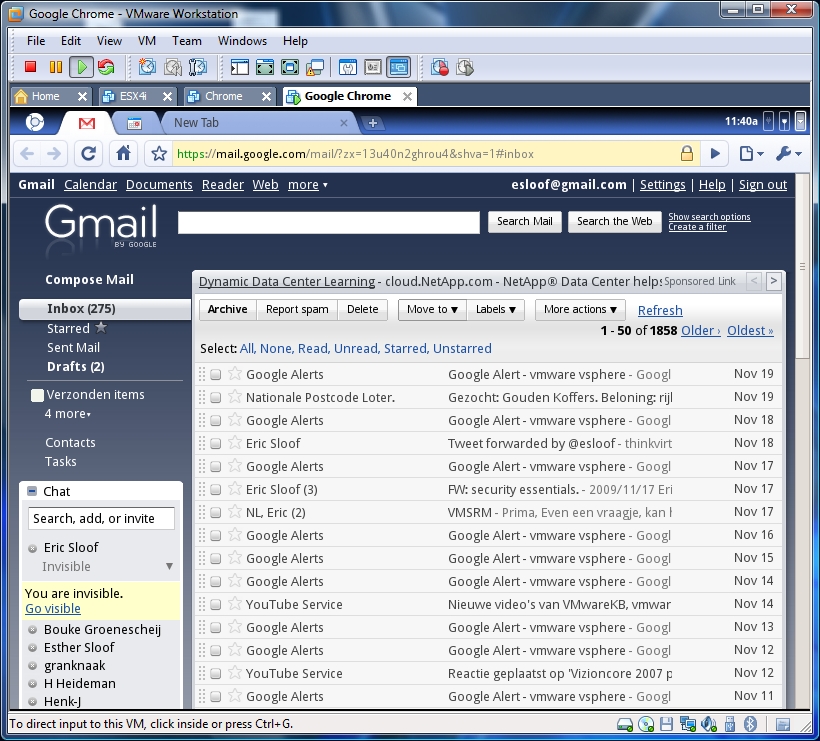
 After Google announced the availability of the Chrome OS / Chromium OS source code, one of GDGT's engineers (Jon Ursenbach), immediately got to work on compiling the code, trying to see if he could get an instance of Chromium OS running in a virtual machine.

