• Skip to site navigation
  • Skip to blog entries
  • Skip to archive page
  • Skip to right sidebar

My first VMware PowerShell script

NTPRO.NL - Eric Sloof

  • NTPRO.NL
  • Online Training
  • VMworld
  • Videos
  • Tools
  • iTunes
  • About

Sunday, 11 November 2007

My first VMware PowerShell script

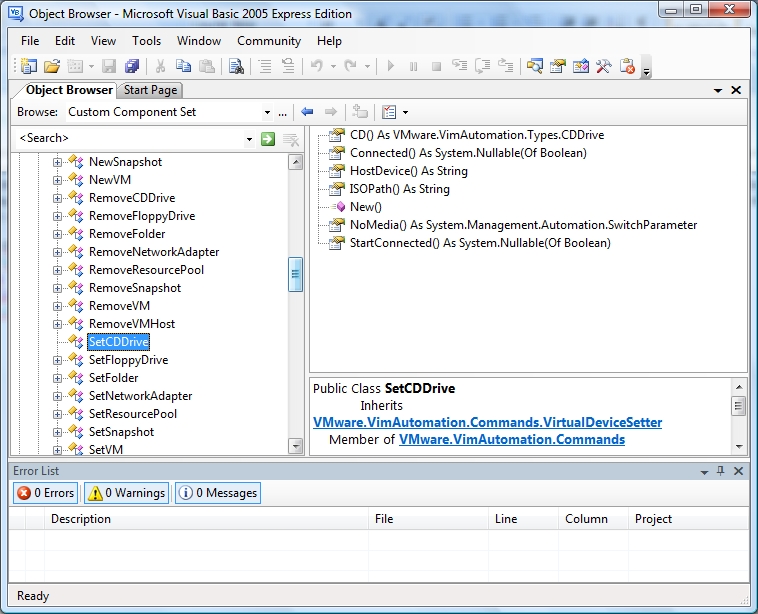
Several months ago I created a Visual Basic program named VMCDConnected. This application checks if one of your virtual machines is connected to an ISO image. When you have created a DRS cluster the virtual machines in this cluster are automatically migrated to the least busy ESX host. These migrations depend on VMotion. The most common show stopper for VMotion is a connected CD that’s not on shared storage. With one click of a button all the CD’s are disconnected. This weekend I had the change to try out the VMware Infrastructure Toolkit for Windows. It provides a core set of Windows PowerShell cmdlets for managing VI. Within minutes I created a script with the same features as my Visual Basic application. The difference is that creating the Visual basic program took me over a month. One other big difference is that the PowerShell script only counts five lines of code. The image shows a glimpse of the Visual Basic Object Browser investigating the Toolkit’s classes and properties. Building Visual Basic application on top of the Toolkit will also become a lot easier.
For the creation of the five-liner I used the script editor from PowerGui and the VMworld presentation “Managing VMware Infrastructure with Windows PowerShell� presented by Antonio Dias and Danny Kim. VMware is preparing a technology preview of the PowerShell.  If you'd be interested in receiving an early version of that software and you'd be willing to try it out and send them feedback, please send email to vi_tk_4win-admin@vmware.com.

Add-PSnapin VMware.VimAutomation.Core
Get-VIServer vcserver.local
$vms = Get-VM
$CDConnected = Get-CDDrive $vms | where {$_.ISOPath -like "*.ISO*"}
Set-CDDrive -connected 0 $CDConnected
Posted by
Eric Sloof
in PowerCLI at 20:51 | 9 Comments | No Trackbacks
Bookmark and Share
Trackbacks
Trackback specific URI for this entry
No Trackbacks
Comments
Display comments as (Linear | Threaded)
Damn, just 5 lines... Powerful stuff. Just send them an email, hope i get picked. Very interesting.
#1 Duncan (Homepage) on 2007-11-11 23:00 (Reply)
Hi Just started playing with powershell but missing one crucial thing. How do you make the connection to the VMware commandlets? Should I download an SDK? Which one? The pelr? VMXI ? Not sure were to start. Gabrie
#2 Gabrie van Zanten on 2007-11-12 01:28 (Reply)
Very nice script. Don't you love the power that this new management interface gives us. I';ve posted a new entry in my blog about how to create VMs using Powershell at http://www.bjd145.org/scripting_blog.html
#3 Brian (Homepage) on 2007-11-14 04:24 (Reply)
HI Brian, Your script looks great, you could use the -confirm:$false; statement to make it unattended. Keep up the good work
#3.1 Eric Sloof (Homepage) on 2007-11-14 06:40 (Reply)
Is there a forum we could join and post our findings and new scripts? I've been playing with it and like this PowerShell very much. I ran into some issues about certificates, but was able to generate new certs for the VC server and ESX host. Now its running fine when on working on the VC host itself (host is XP). Unfortunately, when connecting from my Vista workstation to the XP VC host, I get this error: Get-VIServer : Unexpected Error. ID Core_GetViServer_NewClient_NullClient At line:1 char:19 + $vc = Get-VIServer
#4 Gabrie on 2007-11-14 22:19 (Reply)
Gabrie, Yes, there is a site for Powershell code sharing. It is http://www.powershellcommunity.org. Bleasdell
#4.1 Bleasdell on 2007-12-21 15:50 (Reply)
Hi, I'm very new to vmware scripting. How do i get the vmware power shell snap-in. Not sure how to start with. Thanks
#5 Rajeev on 2007-11-29 08:28 (Reply)
VMware is preparing a technology preview of the PowerShell. If you'd be interested in receiving an early version of that software and you'd be willing to try it out and send them feedback, please send email to vi_tk_4win-admin@vmware.com.
#5.1 Eric Sloof (Homepage) on 2007-11-29 08:42 (Reply)
Nice script. How do I uncheck the connected at power on and also switch from DAtastore ISO to host device?
#6 Joey on 2009-04-28 20:36 (Reply)
Add Comment
Standard emoticons like :-) and ;-) are converted to images.
E-Mail addresses will not be displayed and will only be used for E-Mail notifications.

To prevent automated Bots from commentspamming, please enter the string you see in the image below in the appropriate input box. Your comment will only be submitted if the strings match. Please ensure that your browser supports and accepts cookies, or your comment cannot be verified correctly.
CAPTCHA


Twitter RSS FeedLinkedIn

www.hetesambal.nl

Veeam Webinar with Doug Hazelman: 5 Steps to Successful Backup & Replication for Hyper-V! Watch it now >>

Recent Entries

Storage Design and Implementation in vSphere 5.0 - The Rough Cuts
Thursday, January 19 2012
Top 25 Free Tools for VMware vSphere presented by David Davis and Kendrick Coleman
Monday, January 16 2012
LG Android running VMware Horizon Mobile hands-on
Saturday, January 14 2012
Forbes Guthrie has released the vSphere 5 vReference Card
Thursday, January 12 2012
VMworld Session - VMware vMotion in VMware vSphere 5: Architecture, Performance & Best Practices
Wednesday, January 11 2012
Voice Over IP (VoIP) Performance Evaluation on VMware vSphere 5.0
Tuesday, January 10 2012
VMware vCloud Director 1.5 Performance and Best Practices
Monday, January 9 2012
VMware vCenter Site Recovery Manager 5.0 Performance and Best Practices
Sunday, January 8 2012
New Training - VMware vSphere 5 Design Workshop
Saturday, January 7 2012
New Training - VMware View 5 Install, Configure and Manage
Friday, January 6 2012

Archive

  • February 2012 (3)
  • January 2012 (23)
  • December 2011 (21)
  • November 2011 (24)
  • October 2011 (27)
  • September 2011 (26)
  • August 2011 (35)
  • July 2011 (26)
  • June 2011 (15)
  • May 2011 (20)
  • April 2011 (22)
  • March 2011 (22)
  • February 2011 (18)
  • January 2011 (13)
  • December 2010 (23)
  • November 2010 (18)
  • October 2010 (31)
  • September 2010 (22)
  • August 2010 (23)
  • July 2010 (19)
  • June 2010 (19)
  • May 2010 (19)
  • April 2010 (20)
  • March 2010 (23)
  • February 2010 (22)
  • January 2010 (30)
  • December 2009 (37)
  • November 2009 (29)
  • October 2009 (27)
  • September 2009 (36)
  • August 2009 (35)
  • July 2009 (35)
  • June 2009 (43)
  • May 2009 (35)
  • April 2009 (56)
  • March 2009 (51)
  • February 2009 (69)
  • January 2009 (69)
  • December 2008 (60)
  • November 2008 (56)
  • October 2008 (49)
  • September 2008 (63)
  • August 2008 (44)
  • July 2008 (54)
  • June 2008 (26)
  • May 2008 (34)
  • April 2008 (27)
  • March 2008 (38)
  • February 2008 (29)
  • January 2008 (35)
  • December 2007 (24)
  • November 2007 (23)
  • October 2007 (20)
  • September 2007 (54)
  • August 2007 (15)
  • July 2007 (22)
  • June 2007 (13)
  • May 2007 (8)
  • April 2007 (20)
  • March 2007 (10)
  • Recent...
  • Older...
Based on the s9y Bulletproof template framework
Powered by s9y – Template by Bulletproof development team.
  • NTPRO.NL
  • Online Training
  • VMworld
  • Videos
  • Tools
  • iTunes
  • About