• Skip to site navigation
  • Skip to blog entries
  • Skip to archive page
  • Skip to right sidebar

VMWare Infrastructure Task Library in Workflow Studio

Eric Sloof - NTPRO.NL

  • NTPRO.NL
  • Online Training
  • VMworld
  • Videos
  • Tools
  • iTunes
  • About

Wednesday, 28 November 2007

VMWare Infrastructure Task Library in Workflow Studio

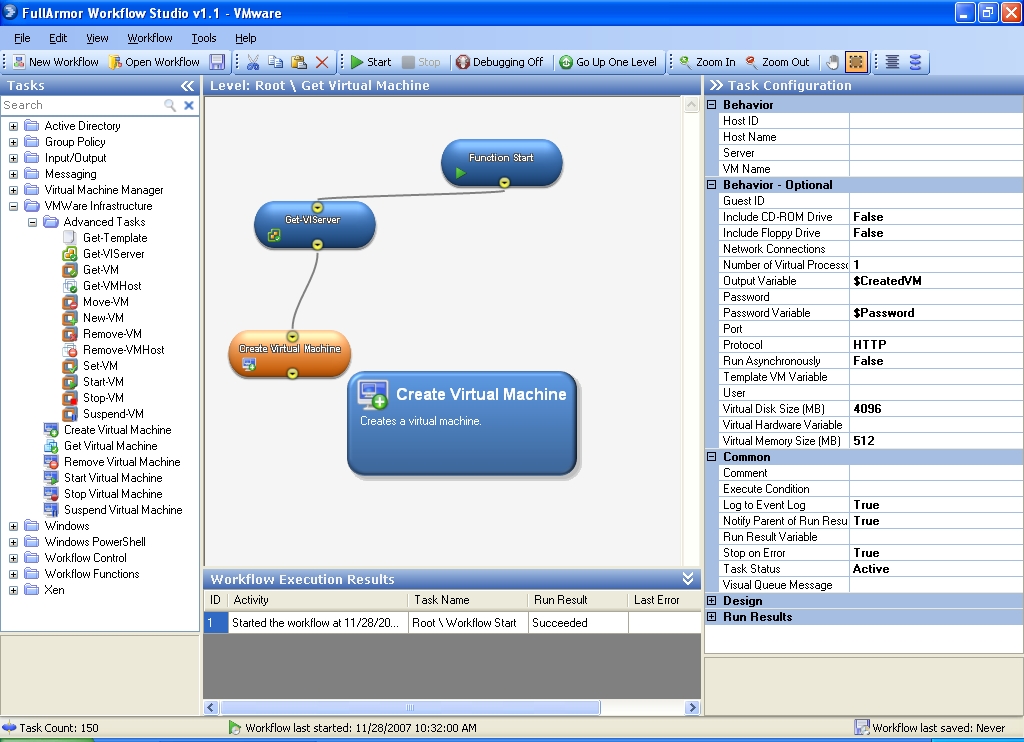
FullArmor delivers on its promise of virtual machine provisioning and automation capabilities with the release of Workflow Studio version 1.1 beta 1.  So, what's new in version 1.1? Among the eleven new enhancement there is one interesting library in particular: the VMware Infrastructure Task Library. With this library you can completely provision and automate your VI3 infrastructure.  Create, start, stop, suspend, resume, move, delete, and modify VMs.
  • Microsoft System Center Virtual Machine Manager Task Library
    • Completely provision and automate your SCVMM infrastructure.  Create, start, stop, suspend, resume, shutdown, delete, and modify VMs.
  • VMWare Infrastructure Task Library
    • Completely provision and automate your VI3 infrastructure.  Create, start, stop, suspend, resume, move, delete, and modify VMs
  • Xen Task Library
    • Completely provision and automate your Xen infrastructure.  Create, start, stop, suspend, resume, shutdown, reboot, move, and get metrics on your Xen VMs.
  • New Windows OS tasks
    • New tasks for copying, moving, and deleting folders on your storage devices
  • New Windows Management tasks
    • Twenty-Five new tasks for gathering all kinds of Windows management data.  Everything from generic OS statistics to hardware details to disk quota information can now be used in your automation workflows.
  • New Workflow Function tasks
    • Two new Workflow Function tasks allow you to perform mathematical calculations and control workflow variables at runtime.
  • New Workflow Control tasks
    • Two new Workflow Control tasks give you more control over workflow variables used in your workflows.
  • New Active Directory task
    • New Get-Computers task will query Active Directory and get a list of computers for you to use in conjunction with Windows management tasks or any other workflow function.  Full filtering capabilities are included.
  • Updated User Interaction task
    • Now you can display list of items via built-in tasks that allow the user to select from a list to perform custom automation functions.  The list can now be completely dynamically driven.
  • User interface overhaul
    • A new search bar is available for to search for any task to do the job .
    • All panels are collapsible to maximize visibility of your workflow.
    • New toolbar options simplify your work.
  • Performance enhancements
    • Console and runtime performance enhancements mean less overhead for running workflows.

Download version 1.1 beta 1 today and start taking advantage of all of these new features and capabilities. 

Posted by
Eric Sloof
in VMware at 08:52 | 1 Comment | No Trackbacks
Bookmark and Share
Trackbacks
Trackback specific URI for this entry
No Trackbacks
Comments
Display comments as (Linear | Threaded)
Cool Stuff All the steps are clearly mentioned. Thanks
#1 taskworkflow (Homepage) on 2008-12-25 09:38 (Reply)
Add Comment
Standard emoticons like :-) and ;-) are converted to images.
E-Mail addresses will not be displayed and will only be used for E-Mail notifications.

To prevent automated Bots from commentspamming, please enter the string you see in the image below in the appropriate input box. Your comment will only be submitted if the strings match. Please ensure that your browser supports and accepts cookies, or your comment cannot be verified correctly.
CAPTCHA


Twitter RSS FeedLinkedIn

www.hetesambal.nl

Veeam Webinar with Doug Hazelman: 5 Steps to Successful Backup & Replication for Hyper-V! Watch it now >>

Recent Entries

Video - vCloud Director 1.5 - Quick Start
Sunday, January 22 2012
White Paper - Mobility and Disaster Recovery Solution for Virtualized Tier-1 Enterprise Applications
Saturday, January 21 2012
Video - Install vSphere Syslog Collector and configure ESXi logging
Friday, January 20 2012
Storage Design and Implementation in vSphere 5.0 - The Rough Cuts
Thursday, January 19 2012
Top 25 Free Tools for VMware vSphere presented by David Davis and Kendrick Coleman
Monday, January 16 2012
LG Android running VMware Horizon Mobile hands-on
Saturday, January 14 2012
Forbes Guthrie has released the vSphere 5 vReference Card
Thursday, January 12 2012
VMworld Session - VMware vMotion in VMware vSphere 5: Architecture, Performance & Best Practices
Wednesday, January 11 2012
Voice Over IP (VoIP) Performance Evaluation on VMware vSphere 5.0
Tuesday, January 10 2012
VMware vCloud Director 1.5 Performance and Best Practices
Monday, January 9 2012

Archive

  • February 2012 (7)
  • January 2012 (22)
  • December 2011 (21)
  • November 2011 (24)
  • October 2011 (27)
  • September 2011 (26)
  • August 2011 (35)
  • July 2011 (26)
  • June 2011 (15)
  • May 2011 (20)
  • April 2011 (22)
  • March 2011 (22)
  • February 2011 (18)
  • January 2011 (13)
  • December 2010 (23)
  • November 2010 (18)
  • October 2010 (31)
  • September 2010 (22)
  • August 2010 (23)
  • July 2010 (19)
  • June 2010 (19)
  • May 2010 (19)
  • April 2010 (20)
  • March 2010 (23)
  • February 2010 (22)
  • January 2010 (30)
  • December 2009 (37)
  • November 2009 (29)
  • October 2009 (27)
  • September 2009 (36)
  • August 2009 (35)
  • July 2009 (35)
  • June 2009 (43)
  • May 2009 (35)
  • April 2009 (56)
  • March 2009 (51)
  • February 2009 (69)
  • January 2009 (69)
  • December 2008 (60)
  • November 2008 (56)
  • October 2008 (49)
  • September 2008 (63)
  • August 2008 (44)
  • July 2008 (54)
  • June 2008 (26)
  • May 2008 (34)
  • April 2008 (27)
  • March 2008 (38)
  • February 2008 (29)
  • January 2008 (35)
  • December 2007 (24)
  • November 2007 (23)
  • October 2007 (20)
  • September 2007 (54)
  • August 2007 (15)
  • July 2007 (22)
  • June 2007 (13)
  • May 2007 (8)
  • April 2007 (20)
  • March 2007 (10)
  • Recent...
  • Older...
Based on the s9y Bulletproof template framework
Powered by s9y – Template by Bulletproof development team.
  • NTPRO.NL
  • Online Training
  • VMworld
  • Videos
  • Tools
  • iTunes
  • About