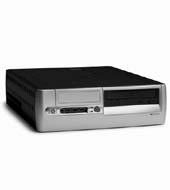
Since running ESX 3.5 on Workstation 6 seems to be impossible, I had to find another way to explore the new features of ESX 3.5. Searching for a cheap supported configuration isn’t an easy job. You have to find a supported motherboard, network card and SATA controller. I have found a desktop with all these items combined. You can use The HP Compaq d530 - Small form factor (SFF) DG755A desktop. My model has a CPU from Intel Pentium 4 CPU 2.8 GHz, a NIC from Broadcom Corporatoin NetXtreme BCM5782 Gigabit Ethernet and a SATA 82801EB (ICH5) SATA Controller. I added a 512 Mb memory bank so I have 1 Gigabyte in total. Enough to host a few virtual machines
.
Tuesday, 25 March 2008
The ultimate ESX 3.5 white box
Trackbacks
The complete white box list
Two weeks ago I published an article about the ultimate white box, well I wasn’t the only one searching for some cheap hardware to host ESX 3.5. Dave Mishchenko, a VMware community champion from Vancouver, discovered a way to extract a list of supported
Weblog: NTPRO.NL
Tracked: Jan 14, 21:28
Dave Mishchenko’s Whitebox list
Yesterday Dave over at vm-help.com posted a comment on the ultimate white box article with an URL. I tough let’s give it a try and visited his website. What I saw there is incredible a complete list with Motherboards and unsupported servers that work with
Weblog: NTPRO.NL
Tracked: Mar 26, 21:22


Even though I added a supported nic, the onboard nic was recognized by ESX, so I didn't need the additional nic.
I didn't have any SATA drives or a SATA RAID controller, so I used the instructions found here: http://www.vmug.nl/downloads/VMWare_NFS_en_iSCSI.pdf.
It isn't the fastest box, but it works.
Thanks,
Jase
http://www.jasemccarty.com/blog/2008/01/esx-35-on-hp-d530.html
Just recently bought myself a D530 (2.66 Ghz with 1.5 Gb mem) but I have a weird problem with 3i. I was able to set it up with a problem and could format the SATA disk with VMFS. I was also able to convert an existing VM from vmware server to this box, runs fine. However, when I create a new vm with XP, the XP setup will not recognize the disk. Any ideas? I tried both LSI and Buslogic.
Thanks,
GJ.
P.s. anyone who got Hyperthreading enabled with the D530?
http://www.vmware.com/download/ws/drivers_tools.html
// Joel
I checked boot systems a finaly I decided for 2.66 version because of power consumption.
In idle has my "server" 45W and fully loaded 90W.
2.8 version has 70-80W in idle mode and 130W fully loaded. Big sacrifice for a little bit better performance, I guess....
http://www.vm-help.com/esx/esx3.5/Whiteboxes_SATA_Controllers_for_ESX_3.5_3i.htm
I use a HP dc7600. Version 3.5 was working, 3.0 not. It has 1 Gb of memory and is not really fast. I will try to install more memory.
Fred
After searching i found a HP DC7100 tower P4 HT 3Ghz
Putted 2GB memory in it for now (rather 4GB)
A changed the harddrive by a cheap 360GB disk
This is also a cheap machine to buy.
Installation went fine. And had the same problem installing XP.
Good solution to try it at home
http://www.ipmer.com/2008/04/esx-home-lab-on-cheap.html
CARLO.