• Skip to site navigation
  • Skip to blog entries
  • Skip to archive page
  • Skip to right sidebar

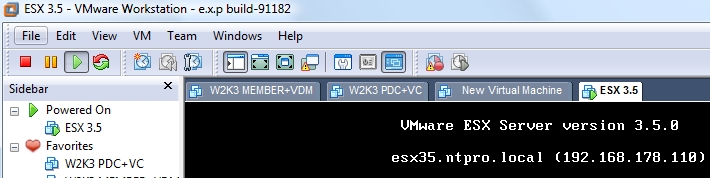
ESX 3.5 is running on Workstation 6.5 Build 91182 !!!

NTPRO.NL - Eric Sloof

  • NTPRO.NL
  • Online Training
  • VMworld
  • Videos
  • Tools
  • iTunes
  • About

Saturday, 17 May 2008

ESX 3.5 is running on Workstation 6.5 Build 91182 !!!

Last night I received an anonymous tip from someone deep inside the VMware Workstation development team. The tip I received was all about running ESX 3.5 inside Workstation 6.5 and the possibility to power on a VM.

Try the latest Workstation 6.5 Beta 1 Refresh and you are in for a surprise...

This afternoon I downloaded the latest build of the Workstation 6.5 Beta and tried to run ESX 3.5 inside it.

Download VMware Workstation 6.5 Beta VMware Workstation 6.5 Beta
Latest Version: Beta | 5/12/08 | Build 91182


I created a standard (other Linux) VM with two CPU's, 1024 Gb mem and a 20 GB SCSI disk. I also added the following tree lines to the VMX file.

ethernet0.virtualDev = "e1000"
monitor.virtual_exec = "hardware"
monitor_control.restrict_backdoor = "true"
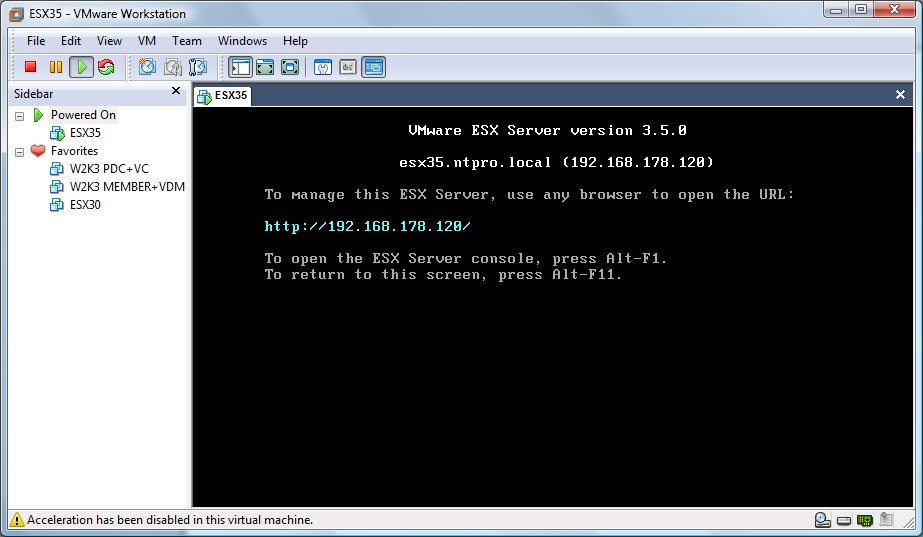
This time running ESX 3.5 inside WS 6.5 worked, no slow booting anymore. The test lab is online again. After installing ESX 3.5 update 1 the following screenshot showed up within minutes.


I contacted Keith Adams, he’s one of the WS 6.5 engineers and asked him if he could confirm that we can use ESX 3.5 in the latest build of VMware Workstation 6.5, he confirmed :

Indeed, we've changed the nomenclature around. It's now:
monitor.virtual_exec="hardware"|"software"|"auto"
(Note: monitor, not monitor_control.)

For all guest os types:
hardware = VT on Intel, SVM on AMD
software = BT for all 32-bit guests, and on BT-capable 64-bit AMD hardware for 64-bit guests as well
auto     = Let us guess what to do (the default).

I also contacted Ulli over at sanbarrow.com, he’s the king of VMX tweaks and he responded directly with :

Hi Eric

use
guestOS = "other"
ethernet0.virtualDev = "e1000"
scsi0.virtualDev = "lsilogic"
monitor.virtual_exec = "hardware"
monitor_control.restrict_backdoor = "true"

I'd also recommend to install the ESX itself to IDE and use the LSI-logic disks for VMFS Use 2 virtual CPUs only when you have a quadcore system - otherwise use one CPU

Ulli

There's still an issue with powering on a VM.

*** VMware Workstation internal monitor error ***
vcpu-1:ASSERT vmcore/private/a20_shared.h:67
There is a problem in this version of VMware Workstation.
We rely on your feedback to improve the quality of our product. Please submit a support request that describes the problem at our Web page "http://www.vmware.com/info?id=8". Do not forget to attach the log file (C:\Virtual Machines\ESX 3.5\vmware.log) and the core file(s) (C:\Virtual Machines\ESX 3.5\vmware-core[0-1].gz, C:\Virtual Machines\ESX 3.5\vmware64-core[0-1].gz, C:\Users\Eric Sloof\AppData\Roaming\VMware\vmware-vmx-debug-4064.dmp).
To collect data to submit to VMware support, select Help > About and click "Collect Support Data". You can also run the "vm-support" script in the Workstation folder directly.
We appreciate your feedback,
  -- the VMware Workstation team.


Posted by
Eric Sloof
in VMware at 21:22 | 21 Comments | No Trackbacks
Bookmark and Share
Trackbacks
Trackback specific URI for this entry
No Trackbacks
Comments
Display comments as (Linear | Threaded)
Eric this vmx works for me. From first sight I would say that ESX 3.5 in WS 6.5 is much slower than ESX 3.0.2 in WS 6.0.* Ulli checkpoint.vmState = "" checkpointFBSize = "134217728" config.version = "8" deploymentPlatform = "windows" displayName = "esx305" ethernet0.addressType = "generated" ethernet0.generatedAddress = "00:0c:29:a4:31:7f" ethernet0.generatedAddressOffset = "0" ethernet0.pciSlotNumber = "32" ethernet0.present = "TRUE" ethernet0.virtualdev = "e1000" ethernet0.wakeOnPcktRcv = "FALSE" ethernet1.addressType = "generated" ethernet1.connectionType = "nat" ethernet1.generatedAddress = "00:0c:29:a4:31:89" ethernet1.generatedAddressOffset = "10" ethernet1.pciSlotNumber = "33" ethernet1.present = "TRUE" ethernet1.virtualdev = "e1000" ethernet1.wakeOnPcktRcv = "FALSE" ethernet2.addressType = "generated" ethernet2.connectionType = "custom" ethernet2.generatedAddress = "00:0c:29:a4:31:93" ethernet2.generatedAddressOffset = "20" ethernet2.pciSlotNumber = "34" ethernet2.present = "TRUE" ethernet2.virtualdev = "e1000" ethernet2.vnet = "VMNet4" ethernet2.wakeOnPcktRcv = "FALSE" floppy0.autodetect = "TRUE" floppy0.fileName = "A:" floppy0.present = "FALSE" guestOS = "other" ide0:0.fileName = "esx302system.vmdk" ide0:0.present = "TRUE" ide0:0.redo = "" ide1:0.autodetect = "TRUE" ide1:0.deviceType = "cdrom-image" ide1:0.fileName = "G:\esx35\esx-3.5.0-64607.iso" ide1:0.present = "TRUE" isolation.tools.hgfs.disable = "TRUE" memsize = "1024" mks.enable3d = "TRUE" mks.keyboardFilter = "allow" monitor.virtual_exec = "hardware" monitor_control.restrict_backdoor = "true" monitor_control.vt32 = "true" numvcpus = "1" nvram = "Other.nvram" pciBridge0.pciSlotNumber = "17" pciBridge0.present = "TRUE" pciBridge4.functions = "8" pciBridge4.pciSlotNumber = "18" pciBridge4.present = "TRUE" pciBridge4.virtualDev = "pcieRootPort" pciBridge5.functions = "8" pciBridge5.pciSlotNumber = "19" pciBridge5.present = "TRUE" pciBridge5.virtualDev = "pcieRootPort" pciBridge6.functions = "8" pciBridge6.pciSlotNumber = "20" pciBridge6.present = "TRUE" pciBridge6.virtualDev = "pcieRootPort" pciBridge7.functions = "8" pciBridge7.pciSlotNumber = "36" pciBridge7.present = "TRUE" pciBridge7.virtualDev = "pcieRootPort" scsi0.pciSlotNumber = "16" scsi0.present = "TRUE" scsi0.virtualDev = "lsilogic" scsi0:0.fileName = "vmfs_esx305.vmdk" scsi0:0.present = "TRUE" scsi0:0.redo = "" sound.autodetect = "TRUE" sound.fileName = "-1" sound.present = "FALSE" svga.autodetect = "TRUE" tools.remindInstall = "TRUE" tools.upgrade.policy = "useGlobal" uuid.bios = "56 4d 8c 86 58 c4 80 c9-d4 72 30 48 cf a4 31 7f" uuid.location = "56 4d 8c 86 58 c4 80 c9-d4 72 30 48 cf a4 31 7f" virtualHW.productCompatibility = "hosted" virtualHW.version = "6" vmci0.id = "-811323009" vmci0.pciSlotNumber = "35" vmci0.present = "TRUE" Add Comment
#1 Ulli Hankeln (Homepage) on 2008-05-17 23:11 (Reply)
Hi Ulli, Can you confirm that you can actaully start the ESX 3.5 VM within Workstation 6.5 ? Any additonal information on your confifguration would help. Thanks in advance, Michael K.
#1.1 Michael K. on 2008-05-19 13:55 (Reply)
Hello, I am trying to run vmware 3.5 (ESX_3.5.0_Update_3_123630.iso) on Workstation 6.5 build 118166 I've allocated 1024MB of RAM and followed white paper on. http://knowledge.xtravirt.com/white-papers/esx-3x.html I have an issue of slow boot up. What is a "typical" bootup time? Regards, vitaly
#1.2 Vitaly on 2008-11-18 18:11 (Reply)
Cool, I 'm looking for this long time. I think this is the best time to upgrade my VM workstation and ESX running on my desktop.
#2 Planet Malaysia (Homepage) on 2008-05-18 04:31 (Reply)
The reason why its slower is because the /bin/debug folder is not yet renamed. Last beta versions had the same issue until I renamed the beta (default option set to true) debug bin. -Tarry
#3 Anonymous on 2008-05-18 19:46 (Reply)
I had hope but I am unable to power on a VM running inside ESX 3.5 update1 on WKS build 91182. Any ideas?
#4 tom miller (Homepage) on 2008-05-18 21:17 (Reply)
Tom, I contacted the WS development team and they told me it’s a bug and I should file a support request so I did. Let’s wait and see. Eric Sloof
#4.1 Eric Sloof (Homepage) on 2008-05-18 21:23 (Reply)
Can you let your pals know that there is also a high demand to run esx on vmware fusion for us mac users
#5 jason on 2008-05-19 14:42 (Reply)
@ Michael K. Yes - I can confirm that I was able to start VMs in the ESX-VM If it fails for you - check your vmware.log. If Workstation changes the vmx-entry monitor.virtual_exec = "hardware" to monitor.virtual_exec = "software" then your CPU doesn't qualify. Check your BIOS if you have enabled VT or SVM properly. By the way - I use a HP notebook with Dualcore T5600 CPUs Ulli
#6 Ulli (Homepage) on 2008-05-19 23:12 (Reply)
Hello, I'm also having problem with slow booting up the VM running ESX 3.5.0. It also used 100% CPU during boot up. Please advise. here is my vmx file: .encoding = "windows-1252" config.version = "8" virtualHW.version = "4" numvcpus = "2" scsi0.present = "TRUE" scsi0.virtualDev = "lsilogic" memsize = "1024" scsi0:0.present = "TRUE" scsi0:0.fileName = "hostesx1.vmdk" ide1:0.present = "TRUE" ide1:0.fileName = "E:\VMware\Software\esx-3.5.0_Update_3-123630.iso" ide1:0.deviceType = "cdrom-image" ethernet0.present = "TRUE" ethernet0.wakeOnPcktRcv = "FALSE" ethernet1.present = "TRUE" ethernet1.virtualdev = "e1000" ethernet1.connectionType = "bridged" ethernet1.addressType = "generated" monitor_control.restrict_backdoor = "TRUE" monitor.virtual_exec = "automatic" roamingVM.exitBehavior = "go" displayName = "hostesx1" guestOS = "other" nvram = "hostesx1.nvram" virtualHW.productCompatibility = "esx" ft.secondary0.enabled = "TRUE" tools.upgrade.policy = "useGlobal" extendedConfigFile = "hostesx1.vmxf" floppy0.fileName = "A:" ethernet0.addressType = "generated" ethernet1.generatedAddress = "00:0c:29:1f:f2:d7" uuid.location = "56 4d 94 6a a5 37 8b 12-68 45 91 d5 1a 1f f2 cd" uuid.bios = "56 4d 94 6a a5 37 8b 12-68 45 91 d5 1a 1f f2 cd" scsi0:0.redo = "" vmotion.checkpointFBSize = "16777216" ethernet0.generatedAddress = "00:0c:29:1f:f2:cd" ethernet0.generatedAddressOffset = "0" ethernet1.generatedAddressOffset = "10" tools.remindInstall = "FALSE"
#6.1 Deric Ma (Homepage) on 2008-11-19 21:06 (Reply)
additional note: 3.5i build 82664 works for me too - i can start VMs ... essential entries I used for 3.5.i : config.version = "8" deploymentPlatform = "windows" displayName = "esx35i" ethernet0.present = "TRUE" ethernet0.virtualdev = "e1000" floppy0.present = "FALSE" guestOS = "other" ide1:0.autodetect = "TRUE" ide1:0.deviceType = "cdrom-image" ide1:0.fileName = "G:\esx35\esx-3.5.0-64607.iso" ide1:0.present = "TRUE" memsize = "1024" monitor.virtual_exec = "hardware" monitor_control.restrict_backdoor = "true" numvcpus = "1" scsi0.present = "TRUE" scsi0.virtualDev = "lsilogic" scsi0:0.fileName = "esx35i-system.vmdk" scsi0:0.present = "TRUE" sound.present = "FALSE" virtualHW.version = "6"
#7 Ulli (Homepage) on 2008-05-19 23:22 (Reply)
Hi everybody, I'm running two ESX 3.5 on my laptop and a virtual san (Opefiler) on my Dell Server (this as well with ESX 3.5). I can perform a cold migration but not a warm one. What can be the problem. Thanks.
#8 Dario on 2008-07-11 14:22 (Reply)
Hi, Can we run ESX or ESXi on ESXi as VM? I tried to use similar entries, but it didn't boot. Thanks
#9 Faisal (Homepage) on 2008-11-24 08:03 (Reply)
I am facing very slower startup after installation (like 1hour).I followed xavirt blog. my desktop spec. intel E7300, ASUS P5N-MX, 3GB ram. is there any hardware changes i should consider.
#10 suman on 2008-11-30 02:14 (Reply)
Hi everybody, I officially use VMWare Workstation 6.5 and also VMWare ESXi and 4 licenses of VMWare Infrastructure 3.5 upd3. I tried to install (only for testing purpose) an instance of ESX (or ESXi) inside of Workstation 6.5 following the procedure described... without success. I use a NEC Powermate ML470 with 6Gb RAM, Intel Core 2 Duo (2,4Ghz). I believe that I've some issues with the Intel VT. Without enabling it, it's very very slow (unusable), and when enabling it, I get PSOD. In fact, the Intel VT is VT-D and not VT-X. It's just like if the VT wasn't discovered by Workstation. Some good idea would be helpfull. Thanks in advance.
#11 Phil on 2009-01-16 11:33 (Reply)
Guys as stated before your major problem will be down to intel VT (unless you run AMD that is). See the following - http://communities.vmware.com/docs/DOC-8978 After following the procedure it went from 2+ hours boot and constant 100% CPU usage, to
#12 Matt (Homepage) on 2009-03-27 13:05 (Reply)
Hi All, I had the same exact error and after lot of frustrating moments, I finally upgraded to VMware Workstation 6.5.2 and now everything is okie dokie. Hope this helps. Bye, Well for slower boot issues, please enable Intel-VT or AMD-V. Else it will take ages to boot. Regards, Biju
#13 Biju Menon (Homepage) on 2009-07-19 06:16 (Reply)
I solved this by setting virtual cpu to 1 instead of 2.
#14 sebastiaan (Homepage) on 2009-10-01 14:07 (Reply)
Hi I'm Rajesh. I'm trying to create a test lab for esx in vmware workstation 7 and able to install and work esx 3.5 , when i try to add the host in cluster its giving the (The host's CPU hardware should support the Enhanced VMotion Compatibility mode that is enabled for this cluster, but some of the necessary CPU features are missing. Check the host's BIOS configuration to ensure that no necessary features are disabled (such as XD and VT for Intel, or NX for AMD). Host details windows 2003 ent, processor intel xeon cpu e5405 and its a blade server vm details .encoding = "windows-1252" config.version = "8" virtualHW.version = "7" maxvcpus = "4" scsi0.present = "TRUE" scsi0.virtualDev = "lsilogic" memsize = "1024" mem.hotadd = "TRUE" scsi0:0.present = "TRUE" scsi0:0.fileName = "Red Hat Enterprise Linux 5 64-bit.vmdk" ide1:0.present = "TRUE" ide1:0.autodetect = "TRUE" ide1:0.deviceType = "cdrom-image" ethernet0.present = "TRUE" ethernet0.connectionType = "bridged" ethernet0.virtualDev = "e1000" ethernet0.wakeOnPcktRcv = "FALSE" ethernet0.addressType = "generated" usb.present = "TRUE" ehci.present = "TRUE" pciBridge0.present = "TRUE" pciBridge4.present = "TRUE" pciBridge4.virtualDev = "pcieRootPort" pciBridge4.functions = "8" pciBridge5.present = "TRUE" pciBridge5.virtualDev = "pcieRootPort" pciBridge5.functions = "8" pciBridge6.present = "TRUE" pciBridge6.virtualDev = "pcieRootPort" pciBridge6.functions = "8" pciBridge7.present = "TRUE" pciBridge7.virtualDev = "pcieRootPort" pciBridge7.functions = "8" vmci0.present = "TRUE" roamingVM.exitBehavior = "go" displayName = "ESX1" guestOS = "rhel5-64" nvram = "Red Hat Enterprise Linux 5 64-bit.nvram" virtualHW.productCompatibility = "hosted" extendedConfigFile = "Red Hat Enterprise Linux 5 64-bit.vmxf" numvcpus = "2" cpuid.coresPerSocket = "2" ide1:0.fileName = "D:\Os\ESX 3.5.iso" ethernet0.generatedAddress = "00:0c:29:c2:bd:0e" tools.syncTime = "FALSE" uuid.location = "56 4d 02 f8 1d 29 d3 3d-d5 7b b8 42 94 c2 bd 0e" uuid.bios = "56 4d 02 f8 1d 29 d3 3d-d5 7b b8 42 94 c2 bd 0e" cleanShutdown = "FALSE" replay.supported = "FALSE" replay.filename = "" scsi0:0.redo = "" pciBridge0.pciSlotNumber = "17" pciBridge4.pciSlotNumber = "21" pciBridge5.pciSlotNumber = "22" pciBridge6.pciSlotNumber = "23" pciBridge7.pciSlotNumber = "24" scsi0.pciSlotNumber = "16" usb.pciSlotNumber = "32" ethernet0.pciSlotNumber = "33" ehci.pciSlotNumber = "34" vmci0.pciSlotNumber = "35" vmotion.checkpointFBSize = "134217728" ethernet0.generatedAddressOffset = "0" vmci0.id = "-1799176946" tools.remindInstall = "TRUE" disable_acceleration = "FALSE" monitor.virtual_mmu = "automatic" ethernet0.linkStatePropagation.enable = "TRUE" mks.enable3d = "TRUE" vmi.present = "FALSE" floppy0.present = "FALSE" Pls help me in this by Rajesh.
#15 Rajesh on 2010-04-09 16:36 (Reply)
Rajesh. If you ESX box boots in under 20 minutes the VT is definately working properly. I believe the reason you can't setup an EVC cluster is because the VT instructions of the CPU aren't available to the guest OS's inside workstation. The feature would have to be enabled in the BIOS of the virtual machine, which I'm certain isn't supported. Matt
#15.1 Matt Proud (Homepage) on 2010-04-13 00:05 (Reply)
I was having the slow ESX 3.5 startup. One line that I was missing in my .vmx file was "monitor.virtual_exec = "hardware"". once I added that, plus all the other ususal edits, my esx host started up in just a couple of minutes. Below are all the edits that I added: monitor_control.restrict_backdoor = TRUE monitor_control.vt32 = TRUE monitor.virtual_exec = "hardware" ethernet0.present = TRUE ethernet0.virtualDev = "e1000" ethernet0.connectionType = "bridged" ethernet0.addressType = "generated" Also, the HardDrive is set to "LSILOGIC" and the guest OS is "REDHAT" Thanks. -Eddie
#16 Edward Garcia on 2010-06-02 00:28 (Reply)
Add Comment
Standard emoticons like :-) and ;-) are converted to images.
E-Mail addresses will not be displayed and will only be used for E-Mail notifications.

To prevent automated Bots from commentspamming, please enter the string you see in the image below in the appropriate input box. Your comment will only be submitted if the strings match. Please ensure that your browser supports and accepts cookies, or your comment cannot be verified correctly.
CAPTCHA


Twitter RSS FeedLinkedIn

www.hetesambal.nl

Veeam Webinar with Doug Hazelman: 5 Steps to Successful Backup & Replication for Hyper-V! Watch it now >>

Recent Entries

Storage Design and Implementation in vSphere 5.0 - The Rough Cuts
Thursday, January 19 2012
Top 25 Free Tools for VMware vSphere presented by David Davis and Kendrick Coleman
Monday, January 16 2012
LG Android running VMware Horizon Mobile hands-on
Saturday, January 14 2012
Forbes Guthrie has released the vSphere 5 vReference Card
Thursday, January 12 2012
VMworld Session - VMware vMotion in VMware vSphere 5: Architecture, Performance & Best Practices
Wednesday, January 11 2012
Voice Over IP (VoIP) Performance Evaluation on VMware vSphere 5.0
Tuesday, January 10 2012
VMware vCloud Director 1.5 Performance and Best Practices
Monday, January 9 2012
VMware vCenter Site Recovery Manager 5.0 Performance and Best Practices
Sunday, January 8 2012
New Training - VMware vSphere 5 Design Workshop
Saturday, January 7 2012
New Training - VMware View 5 Install, Configure and Manage
Friday, January 6 2012

Archive

  • February 2012 (3)
  • January 2012 (23)
  • December 2011 (21)
  • November 2011 (24)
  • October 2011 (27)
  • September 2011 (26)
  • August 2011 (35)
  • July 2011 (26)
  • June 2011 (15)
  • May 2011 (20)
  • April 2011 (22)
  • March 2011 (22)
  • February 2011 (18)
  • January 2011 (13)
  • December 2010 (23)
  • November 2010 (18)
  • October 2010 (31)
  • September 2010 (22)
  • August 2010 (23)
  • July 2010 (19)
  • June 2010 (19)
  • May 2010 (19)
  • April 2010 (20)
  • March 2010 (23)
  • February 2010 (22)
  • January 2010 (30)
  • December 2009 (37)
  • November 2009 (29)
  • October 2009 (27)
  • September 2009 (36)
  • August 2009 (35)
  • July 2009 (35)
  • June 2009 (43)
  • May 2009 (35)
  • April 2009 (56)
  • March 2009 (51)
  • February 2009 (69)
  • January 2009 (69)
  • December 2008 (60)
  • November 2008 (56)
  • October 2008 (49)
  • September 2008 (63)
  • August 2008 (44)
  • July 2008 (54)
  • June 2008 (26)
  • May 2008 (34)
  • April 2008 (27)
  • March 2008 (38)
  • February 2008 (29)
  • January 2008 (35)
  • December 2007 (24)
  • November 2007 (23)
  • October 2007 (20)
  • September 2007 (54)
  • August 2007 (15)
  • July 2007 (22)
  • June 2007 (13)
  • May 2007 (8)
  • April 2007 (20)
  • March 2007 (10)
  • Recent...
  • Older...
Based on the s9y Bulletproof template framework
Powered by s9y – Template by Bulletproof development team.
  • NTPRO.NL
  • Online Training
  • VMworld
  • Videos
  • Tools
  • iTunes
  • About