• Skip to site navigation
  • Skip to blog entries
  • Skip to archive page
  • Skip to right sidebar

Creating a PowerShell GUI with PrimalForms

Eric Sloof - NTPRO.NL

  • NTPRO.NL
  • Online Training
  • VMworld
  • Videos
  • Tools
  • iTunes
  • About

Sunday, 9 November 2008

Creating a PowerShell GUI with PrimalForms

In this article I’ll give you a short demo how easy it is to create a PowerShell user interface with the free PrimalForms from Sapien. At the 4th of November Sapien released their first public version of PrimalForms. Jeffery Hicks over at Sapien reports :

I hope you are as excited about the release of PrimalForms as I am. In the past creating a Windows form in PowerShell was a very tedious task and one I rarely used except for the most simplest of forms. No more. The free PrimalForms tool lets me create a very rich Windows form using a WYSIWYG editor. I can export the form to a file, add my PowerShell code and call it a day.

First download PrimalForms at Sapien’s the free tools section. After installing, you just create a wonderful user interface and copy the PowerShell script  code to your clipboard.
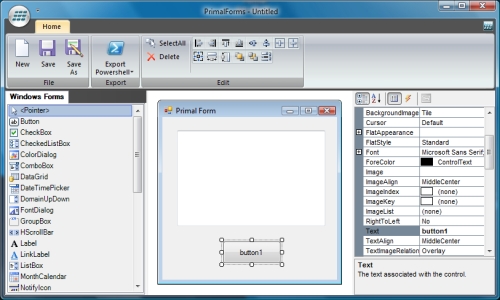
Create a PowerShell user interface

In this example I created a button and a multiline text field. I copied my code to the PowerGui script editor and added a few lines of my own code. The following two lines are added to the top of the script.

Get-PSSnapin -registered | Add-PSSnapin -passthru -ErrorAction SilentlyContinue
$Server = Connect-VIServer -Server 192.168.75.128 -User root -Password vmware


When you walk through the script you’ll see the sections where you can add your own code. In this example I added the following code under the button.

#Provide Custom Code for events specified in PrimalForms.
$button1_OnClick=
{
#TODO: Place custom script here
$textBox1.text = Get-VM
}


And here’s the result.
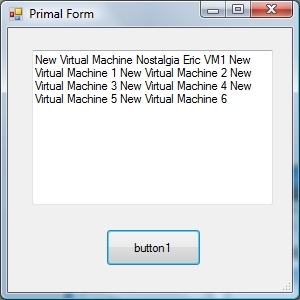
My PowerShell GUI

Get-PSSnapin

-registered | Add-PSSnapin -passthru -ErrorAction SilentlyContinue

$Server

= Connect-VIServer -Server 192.168.75.128 -User root -Password vmware

#Generated Form Function

function

GenerateForm {

########################################################################

# Code Generated By: SAPIEN Technologies PrimalForms 2009 v1.0.0.0

# Generated On: 9-11-2008 20:51

# Generated By: Eric Sloof

########################################################################

#region

[

Import the Assemblesreflection.assembly]::loadwithpartialname("System.Windows.Forms") | Out-Null

[

reflection.assembly]::loadwithpartialname("System.Drawing") | Out-Null

#endregion

#region

Generated Form Objects

$form1

= New-Object System.Windows.Forms.Form

$button1

= New-Object System.Windows.Forms.Button

$textBox1

= New-Object System.Windows.Forms.TextBox

#endregion

Generated Form Objects

#----------------------------------------------

#Generated Event Script Blocks

#----------------------------------------------

#Provide Custom Code for events specified in PrimalForms.

$button1_OnClick

{

=

#TODO: Place custom script here

$textBox1

.text = Get-VM

}

#----------------------------------------------

#region

Generated Form Code

$form1

.Text = 'Primal Form'

$form1

.Name = 'form1'

$form1

.DataBindings.DefaultDataSourceUpdateMode = 0

$System_Drawing_Size

= New-Object System.Drawing.Size

$System_Drawing_Size

.Width = 284

$System_Drawing_Size

.Height = 264

$form1

.ClientSize = $System_Drawing_Size

$button1

.TabIndex = 1

$button1

.Name = 'button1'

$System_Drawing_Size

= New-Object System.Drawing.Size

$System_Drawing_Size

.Width = 95

$System_Drawing_Size

.Height = 37

$button1

$button1

.Size = $System_Drawing_Size.UseVisualStyleBackColor = $True

$button1

.Text = 'button1'

$System_Drawing_Point

= New-Object System.Drawing.Point

$System_Drawing_Point

.X = 98

$System_Drawing_Point

.Y = 201

$button1

$button1

.Location = $System_Drawing_Point.DataBindings.DefaultDataSourceUpdateMode = 0

$button1

.add_Click($button1_OnClick)

$form1

.Controls.Add($button1)

$textBox1

.Multiline = $True

$System_Drawing_Size

= New-Object System.Drawing.Size

$System_Drawing_Size

.Width = 241

$System_Drawing_Size

.Height = 155

$textBox1

$textBox1

.Size = $System_Drawing_Size.DataBindings.DefaultDataSourceUpdateMode = 0

$textBox1

.Name = 'textBox1'

$System_Drawing_Point

= New-Object System.Drawing.Point

$System_Drawing_Point

.X = 24

$System_Drawing_Point

.Y = 22

$textBox1

$textBox1

.Location = $System_Drawing_Point.TabIndex = 0

$form1

.Controls.Add($textBox1)

#endregion

Generated Form Code

#Show the Form

$form1

.ShowDialog()| Out-Null

}

#End Function

#Call the Function

GenerateForm

Posted by
Eric Sloof
in PowerCLI at 21:25 | 1 Comment | No Trackbacks
Bookmark and Share
Trackbacks
Trackback specific URI for this entry
No Trackbacks
Comments
Display comments as (Linear | Threaded)
Good article Eric! Keep up the good work. I am just experimenting on some powershell programming and your website is really helpful! Cheers
#1 Viktor (Homepage) on 2008-11-18 22:01 (Reply)
Add Comment
Standard emoticons like :-) and ;-) are converted to images.
E-Mail addresses will not be displayed and will only be used for E-Mail notifications.

To prevent automated Bots from commentspamming, please enter the string you see in the image below in the appropriate input box. Your comment will only be submitted if the strings match. Please ensure that your browser supports and accepts cookies, or your comment cannot be verified correctly.
CAPTCHA


Submitted comments will be subject to moderation before being displayed.


Twitter RSS FeedLinkedIn

www.hetesambal.nl

Veeam Webinar with Doug Hazelman: 5 Steps to Successful Backup & Replication for Hyper-V! Watch it now >>

Recent Entries

Video - Install vSphere Syslog Collector and configure ESXi logging
Friday, January 20 2012
Storage Design and Implementation in vSphere 5.0 - The Rough Cuts
Thursday, January 19 2012
Top 25 Free Tools for VMware vSphere presented by David Davis and Kendrick Coleman
Monday, January 16 2012
LG Android running VMware Horizon Mobile hands-on
Saturday, January 14 2012
Forbes Guthrie has released the vSphere 5 vReference Card
Thursday, January 12 2012
VMworld Session - VMware vMotion in VMware vSphere 5: Architecture, Performance & Best Practices
Wednesday, January 11 2012
Voice Over IP (VoIP) Performance Evaluation on VMware vSphere 5.0
Tuesday, January 10 2012
VMware vCloud Director 1.5 Performance and Best Practices
Monday, January 9 2012
VMware vCenter Site Recovery Manager 5.0 Performance and Best Practices
Sunday, January 8 2012
New Training - VMware vSphere 5 Design Workshop
Saturday, January 7 2012

Archive

  • February 2012 (5)
  • January 2012 (22)
  • December 2011 (21)
  • November 2011 (24)
  • October 2011 (27)
  • September 2011 (26)
  • August 2011 (35)
  • July 2011 (26)
  • June 2011 (15)
  • May 2011 (20)
  • April 2011 (22)
  • March 2011 (22)
  • February 2011 (18)
  • January 2011 (13)
  • December 2010 (23)
  • November 2010 (18)
  • October 2010 (31)
  • September 2010 (22)
  • August 2010 (23)
  • July 2010 (19)
  • June 2010 (19)
  • May 2010 (19)
  • April 2010 (20)
  • March 2010 (23)
  • February 2010 (22)
  • January 2010 (30)
  • December 2009 (37)
  • November 2009 (29)
  • October 2009 (27)
  • September 2009 (36)
  • August 2009 (35)
  • July 2009 (35)
  • June 2009 (43)
  • May 2009 (35)
  • April 2009 (56)
  • March 2009 (51)
  • February 2009 (69)
  • January 2009 (69)
  • December 2008 (60)
  • November 2008 (56)
  • October 2008 (49)
  • September 2008 (63)
  • August 2008 (44)
  • July 2008 (54)
  • June 2008 (26)
  • May 2008 (34)
  • April 2008 (27)
  • March 2008 (38)
  • February 2008 (29)
  • January 2008 (35)
  • December 2007 (24)
  • November 2007 (23)
  • October 2007 (20)
  • September 2007 (54)
  • August 2007 (15)
  • July 2007 (22)
  • June 2007 (13)
  • May 2007 (8)
  • April 2007 (20)
  • March 2007 (10)
  • Recent...
  • Older...
Based on the s9y Bulletproof template framework
Powered by s9y – Template by Bulletproof development team.
  • NTPRO.NL
  • Online Training
  • VMworld
  • Videos
  • Tools
  • iTunes
  • About


