• Skip to site navigation
  • Skip to blog entries
  • Skip to archive page
  • Skip to right sidebar

VMware Fault Tolerance at your home-lab

NTPRO.NL - Eric Sloof

  • NTPRO.NL
  • Online Training
  • VMworld
  • Videos
  • Tools
  • iTunes
  • About

Monday, 14 September 2009

VMware Fault Tolerance at your home-lab

You can establish fault tolerance for virtual machines hosted by ESX servers that are part of a VMware HA cluster. When you enable VMware FT for a virtual machine, an identical copy of the virtual machine, called a secondary, is established on another host in the cluster. If the first virtual machine fails, the secondary virtual machine takes the original one's place, and a new secondary is created. This process helps provide uninterrupted virtual machine functionality, even in the event of failures. Before you can enable VMware FT, you must have VMware HA enabled and the CPUs of the servers hosting the virtual machines must support VMware FT.
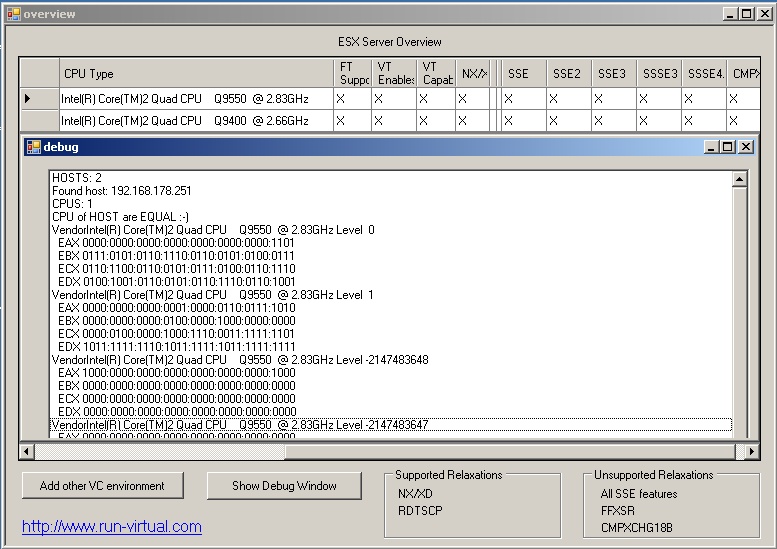
vMotion-Info After publishing an article about the CPU compatibility with VMware Fault Tolerance, my search for a white CPU began. The vLockstep technology used by FT requires the physical processor extensions added to the latest processors from Intel and AMD. In order to run FT, a host must have an FT-capable processor, and both hosts running an FT VM pair must be in the same processor family.
Richard Garsthagen’s “CPU-Host-Info” shows all the available options on both the Intel Q9400 and Q9550 marked true. I’ve used the Intel Q8200 in another white box and it didn’t work, so in order to use FT, you need FT and both the VT options. The next step is run through the Fault Tolerance Checklist.

You can enable VMware Fault Tolerance through the vSphere Client.

Connect vSphere Client to vCenter Server.

Prerequisites 

The option to turn on Fault Tolerance is unavailable (grayed out) for a virtual machine to which any of the following conditions apply:
■  is not in an HA-enabled cluster
■  has one or more snapshots
■  is a template
■  is disconnected
■  resides on a host which is in maintenance or standby mode
■  is performing a record/replay operation

Procedure

1.  Select the Hosts & Clusters view.
2.  Right-click a virtual machine and select Turn Fault Tolerance On.
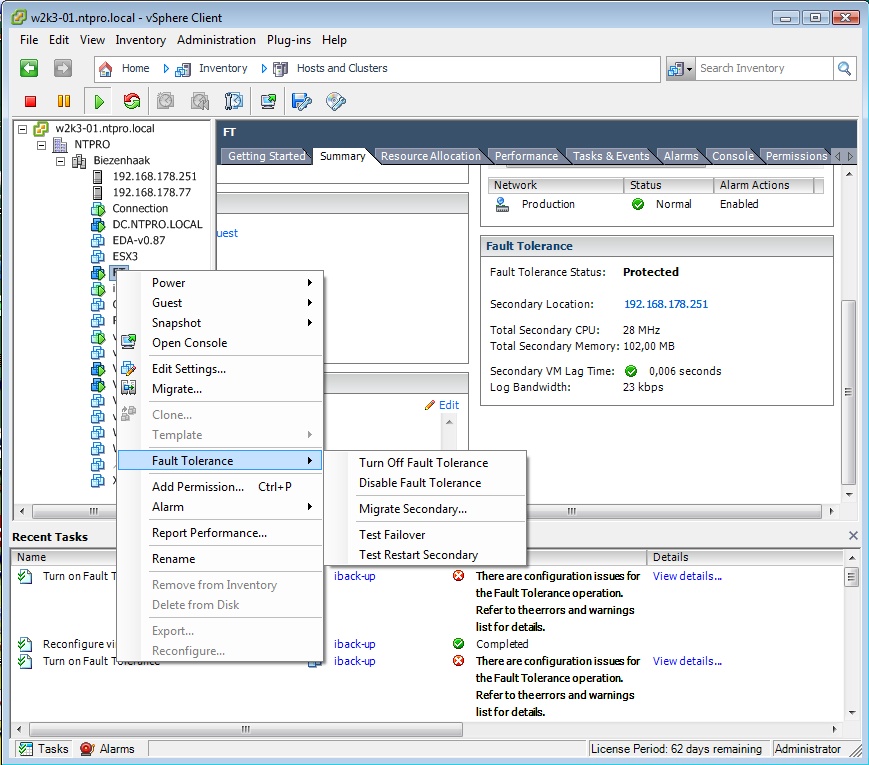
Using Fault Tolerance VMware Fault Tolerance requires eager zeroed thick disks. Virtual machines with thin provisioned or lazy zeroed disks must be powered off while enabling VMware Fault Tolerance in order for vCenter to complete this conversion.

The specified virtual machine is marked as a primary and a secondary is established on another host. Fault Tolerance is now enabled on 4 virtual machines :-)

Posted by
Eric Sloof
in vSphere at 21:06 | 6 Comments | No Trackbacks
Bookmark and Share
Trackbacks
Trackback specific URI for this entry
No Trackbacks
Comments
Display comments as (Linear | Threaded)
yay im glad I chose the q9550 for my home esx lab box.. now i just have to buy another one for FT practise!
#1 Packetboy on 2009-04-29 17:28 (Reply)
I have a Blackbox with; Motherboard Intel® Desktop Board DQ35JO with a Intel Core 2 Duo E8400 processor, Sata controller is ICH9, SATA DVD R/W, 8GB RAM with an add on PCI-E dual port Intel Pro card. When I saw the article about the CPU extensions to support FT and mind was not listed I was a little, lot, disappointed. Just trying to learn vSphere at home. Anyway to my great surprise FT work on this system. It would not load ESX classic but it loaded ESXi just fine. I'm hoping like crazy the GA runs as I have a lot invested for home.
#2 tom miller on 2009-05-01 00:11 (Reply)
I have a Blackbox with a Intel® Desktop Board DQ35JO motherboard with a Intel Core 2 Duo E8400 processor, Sata controller is ICH9, SATA DVD R/W, 8GB RAM with an add on PCI-E dual port Intel Pro card. When I saw the article about the CPU extensions to support FT and mind was not listed I was a little, lot, disappointed. Just trying to learn vSphere at home. Anyway to my great surprise FT work on this system. It would not load ESX classic but it loaded ESXi just fine. I'm hoping like crazy the GA runs as I have a lot invested for home.
#3 buckmaster on 2009-05-01 00:21 (Reply)
I can also confirm that Fault-Tolerance (FT) works with the E8400. See this thread on http://www.vm-help.com/forum/viewtopic.php?f=13&t=244
#3.1 Scoobie Guy on 2009-06-11 16:12 (Reply)
Glad I found your article - it helped steer me towards a (hopefully) FT capable processor for my own home lab!
#4 s002spa (Homepage) on 2009-06-02 20:43 (Reply)
Thanks for the info Eric. Here's info on my relatively inexpensive AMD lab that is VMware FT capable using AM2 Kuma 7750 and AM2 Opteron 1354/1356 processors: http://communities.vmware.com/thread/218140 Datto
#5 Datto on 2009-07-10 16:57 (Reply)
Add Comment
Standard emoticons like :-) and ;-) are converted to images.
E-Mail addresses will not be displayed and will only be used for E-Mail notifications.

To prevent automated Bots from commentspamming, please enter the string you see in the image below in the appropriate input box. Your comment will only be submitted if the strings match. Please ensure that your browser supports and accepts cookies, or your comment cannot be verified correctly.
CAPTCHA


Submitted comments will be subject to moderation before being displayed.


Twitter RSS FeedLinkedIn

www.hetesambal.nl

Veeam Webinar with Doug Hazelman: 5 Steps to Successful Backup & Replication for Hyper-V! Watch it now >>

Recent Entries

Storage Design and Implementation in vSphere 5.0 - The Rough Cuts
Thursday, January 19 2012
Top 25 Free Tools for VMware vSphere presented by David Davis and Kendrick Coleman
Monday, January 16 2012
LG Android running VMware Horizon Mobile hands-on
Saturday, January 14 2012
Forbes Guthrie has released the vSphere 5 vReference Card
Thursday, January 12 2012
VMworld Session - VMware vMotion in VMware vSphere 5: Architecture, Performance & Best Practices
Wednesday, January 11 2012
Voice Over IP (VoIP) Performance Evaluation on VMware vSphere 5.0
Tuesday, January 10 2012
VMware vCloud Director 1.5 Performance and Best Practices
Monday, January 9 2012
VMware vCenter Site Recovery Manager 5.0 Performance and Best Practices
Sunday, January 8 2012
New Training - VMware vSphere 5 Design Workshop
Saturday, January 7 2012
New Training - VMware View 5 Install, Configure and Manage
Friday, January 6 2012

Archive

  • February 2012 (3)
  • January 2012 (23)
  • December 2011 (21)
  • November 2011 (24)
  • October 2011 (27)
  • September 2011 (26)
  • August 2011 (35)
  • July 2011 (26)
  • June 2011 (15)
  • May 2011 (20)
  • April 2011 (22)
  • March 2011 (22)
  • February 2011 (18)
  • January 2011 (13)
  • December 2010 (23)
  • November 2010 (18)
  • October 2010 (31)
  • September 2010 (22)
  • August 2010 (23)
  • July 2010 (19)
  • June 2010 (19)
  • May 2010 (19)
  • April 2010 (20)
  • March 2010 (23)
  • February 2010 (22)
  • January 2010 (30)
  • December 2009 (37)
  • November 2009 (29)
  • October 2009 (27)
  • September 2009 (36)
  • August 2009 (35)
  • July 2009 (35)
  • June 2009 (43)
  • May 2009 (35)
  • April 2009 (56)
  • March 2009 (51)
  • February 2009 (69)
  • January 2009 (69)
  • December 2008 (60)
  • November 2008 (56)
  • October 2008 (49)
  • September 2008 (63)
  • August 2008 (44)
  • July 2008 (54)
  • June 2008 (26)
  • May 2008 (34)
  • April 2008 (27)
  • March 2008 (38)
  • February 2008 (29)
  • January 2008 (35)
  • December 2007 (24)
  • November 2007 (23)
  • October 2007 (20)
  • September 2007 (54)
  • August 2007 (15)
  • July 2007 (22)
  • June 2007 (13)
  • May 2007 (8)
  • April 2007 (20)
  • March 2007 (10)
  • Recent...
  • Older...
Based on the s9y Bulletproof template framework
Powered by s9y – Template by Bulletproof development team.
  • NTPRO.NL
  • Online Training
  • VMworld
  • Videos
  • Tools
  • iTunes
  • About