• Skip to site navigation
  • Skip to blog entries
  • Skip to archive page
  • Skip to right sidebar

Hosting 20 linked clones on SSD storage

NTPRO.NL - Eric Sloof

  • NTPRO.NL
  • Online Training
  • VMworld
  • Videos
  • Tools
  • iTunes
  • About

Tuesday, 26 January 2010

Hosting 20 linked clones on SSD storage

In a previous article I’ve described how to add SSD storage to your ESX server. I’ve also written an article about creating linked clones with the Virtulization Ecoshell. Now I’m going to combine those two techniques and use VMware’s Desktop Reference Architecture Workload Simulator (RAWC is available for VMware Partners only) to generate some real load in the Windows XP virtual machines.

Desktop RAWC runs on a Windows XP guest operating system (memory 1 GB) and is executed on each desktop virtual machine (VM). Each target desktop VM is equipped to run a RAWC workload that simulates typical user behaviour, running an application set commonly used across a broad array of desktop environments. The workload has a set of randomly executed functions that perform operations on a variety of applications.
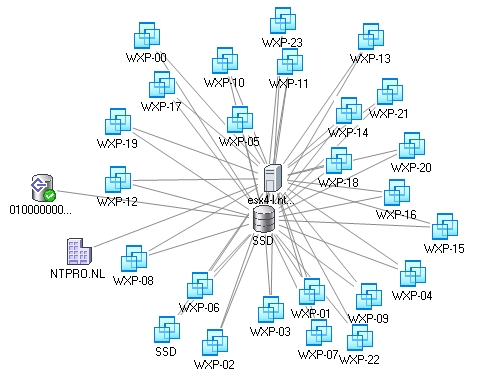
I’ve created 20 linked clones which are all stored on the Intel X25-M Postville SSD 80GB drive. During the execution of the workload, multiple applications are opened at the same time and windows are minimized and maximized as the workload progresses, randomly switching between each application. Individual application operations in my test environment that are randomly performed include:

• Microsoft Word – Open, minimize, maximize, close, insert text, save modifications
• Microsoft Word (Random) – Open, minimize, maximize, close, write random words/numbers, save modifications
• Microsoft Excel – Open, minimize, maximize, close, write random numbers, insert/delete columns/rows, copy/paste formulas, save modifications
• Microsoft PowerPoint – Open, minimize, maximize, close, conduct a slide show presentation
• Internet Explorer – Open, minimize, maximize, close, browse page
• Windows Media Player – Open, close, view a video
• Java – Compile a java project comprised of several hundred files using the JDK to create a software engineering type of workload
• Adobe Acrobat Reader – Open, minimize, maximize, close, browse pages in PDF document
• 7-Zip – Open, close, compress a large file
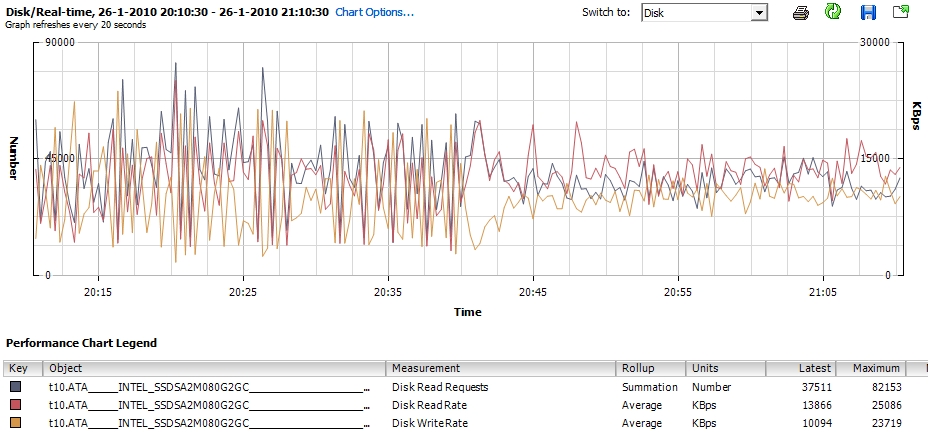
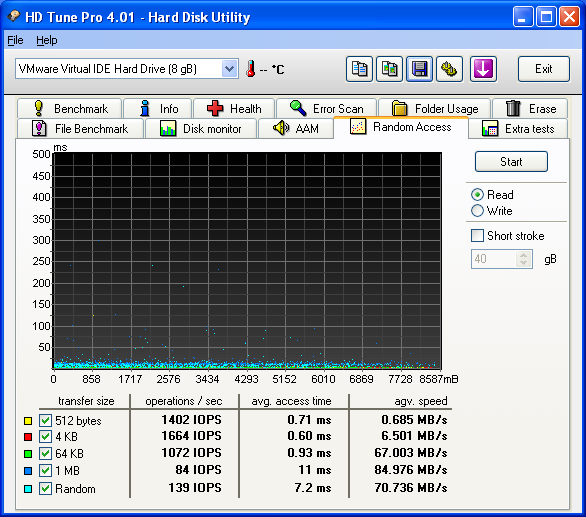
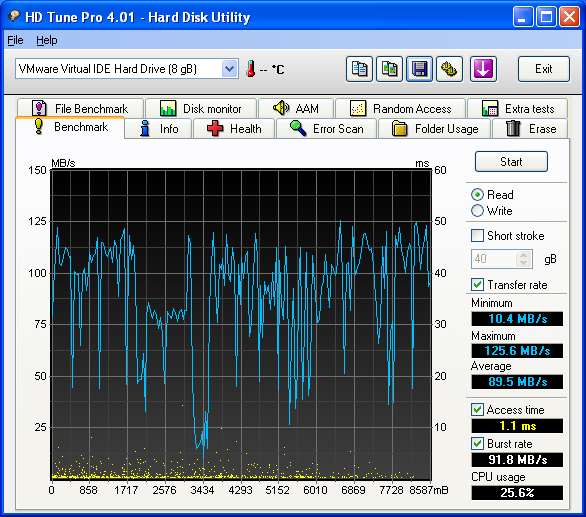
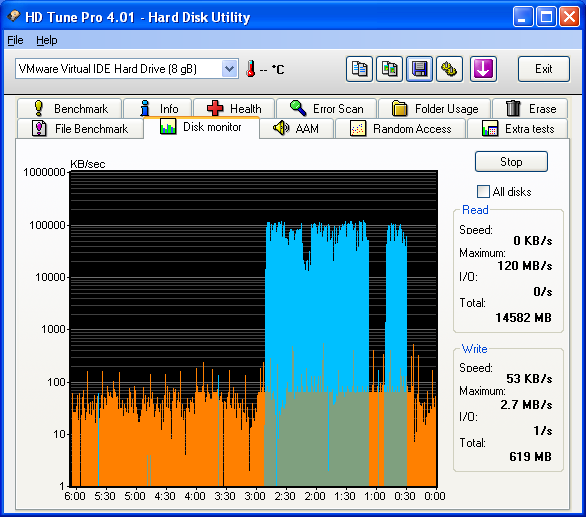
What I wanted to know is how the VMFS on SSD storage would perform under the stress of hosting 20 active XP desktops, writing in their own snapshot and reading from one shared VMDK. I’ve installed HD Tune Pro into one of the virtual desktops and waited for the “Windows Downloading Updates” to kick in, let’s take a look at the maximum read. Seems to perform pretty well.
Posted by
Eric Sloof
in vSphere at 21:46 | 1 Comment | No Trackbacks
Bookmark and Share
Trackbacks
Trackback specific URI for this entry
No Trackbacks
Comments
Display comments as (Linear | Threaded)
Hi Eric, That's pretty impressive performance off of a single non-enterprise SSD. A pair of these in a RAID configuration would certainly appear to offer a decent solution for an SMB type solution. It'd be interesting to see how the linked clone solution could be scaled with adding more SSDs in a RAIDed configuration. Cheers, Simon
#1 Simon (TechHead) (Homepage) on 2010-01-26 23:06 (Reply)
Add Comment
Standard emoticons like :-) and ;-) are converted to images.
E-Mail addresses will not be displayed and will only be used for E-Mail notifications.

To prevent automated Bots from commentspamming, please enter the string you see in the image below in the appropriate input box. Your comment will only be submitted if the strings match. Please ensure that your browser supports and accepts cookies, or your comment cannot be verified correctly.
CAPTCHA


Submitted comments will be subject to moderation before being displayed.


Twitter RSS FeedLinkedIn

www.hetesambal.nl

Veeam Webinar with Doug Hazelman: 5 Steps to Successful Backup & Replication for Hyper-V! Watch it now >>

Recent Entries

Storage Design and Implementation in vSphere 5.0 - The Rough Cuts
Thursday, January 19 2012
Top 25 Free Tools for VMware vSphere presented by David Davis and Kendrick Coleman
Monday, January 16 2012
LG Android running VMware Horizon Mobile hands-on
Saturday, January 14 2012
Forbes Guthrie has released the vSphere 5 vReference Card
Thursday, January 12 2012
VMworld Session - VMware vMotion in VMware vSphere 5: Architecture, Performance & Best Practices
Wednesday, January 11 2012
Voice Over IP (VoIP) Performance Evaluation on VMware vSphere 5.0
Tuesday, January 10 2012
VMware vCloud Director 1.5 Performance and Best Practices
Monday, January 9 2012
VMware vCenter Site Recovery Manager 5.0 Performance and Best Practices
Sunday, January 8 2012
New Training - VMware vSphere 5 Design Workshop
Saturday, January 7 2012
New Training - VMware View 5 Install, Configure and Manage
Friday, January 6 2012

Archive

  • February 2012 (3)
  • January 2012 (23)
  • December 2011 (21)
  • November 2011 (24)
  • October 2011 (27)
  • September 2011 (26)
  • August 2011 (35)
  • July 2011 (26)
  • June 2011 (15)
  • May 2011 (20)
  • April 2011 (22)
  • March 2011 (22)
  • February 2011 (18)
  • January 2011 (13)
  • December 2010 (23)
  • November 2010 (18)
  • October 2010 (31)
  • September 2010 (22)
  • August 2010 (23)
  • July 2010 (19)
  • June 2010 (19)
  • May 2010 (19)
  • April 2010 (20)
  • March 2010 (23)
  • February 2010 (22)
  • January 2010 (30)
  • December 2009 (37)
  • November 2009 (29)
  • October 2009 (27)
  • September 2009 (36)
  • August 2009 (35)
  • July 2009 (35)
  • June 2009 (43)
  • May 2009 (35)
  • April 2009 (56)
  • March 2009 (51)
  • February 2009 (69)
  • January 2009 (69)
  • December 2008 (60)
  • November 2008 (56)
  • October 2008 (49)
  • September 2008 (63)
  • August 2008 (44)
  • July 2008 (54)
  • June 2008 (26)
  • May 2008 (34)
  • April 2008 (27)
  • March 2008 (38)
  • February 2008 (29)
  • January 2008 (35)
  • December 2007 (24)
  • November 2007 (23)
  • October 2007 (20)
  • September 2007 (54)
  • August 2007 (15)
  • July 2007 (22)
  • June 2007 (13)
  • May 2007 (8)
  • April 2007 (20)
  • March 2007 (10)
  • Recent...
  • Older...
Based on the s9y Bulletproof template framework
Powered by s9y – Template by Bulletproof development team.
  • NTPRO.NL
  • Online Training
  • VMworld
  • Videos
  • Tools
  • iTunes
  • About